Sede.
Sell where it happens, on site.
Sede helps your guests engage on site. They order, book, and pay from their phone wherever they are, your staff run the floor from iPads, and every site reports to one HQ.
- Payments on your own Stripe account
- Keeps selling offline
- No app for guests
The product
You have to see it.
Real Sede screens, one flow at a time. Pick a module and scroll through it, screen by screen.
- 01 · HQ
The booking engine
Pick, hold, pay, check in: every offer runs through the same stages.
One booking engine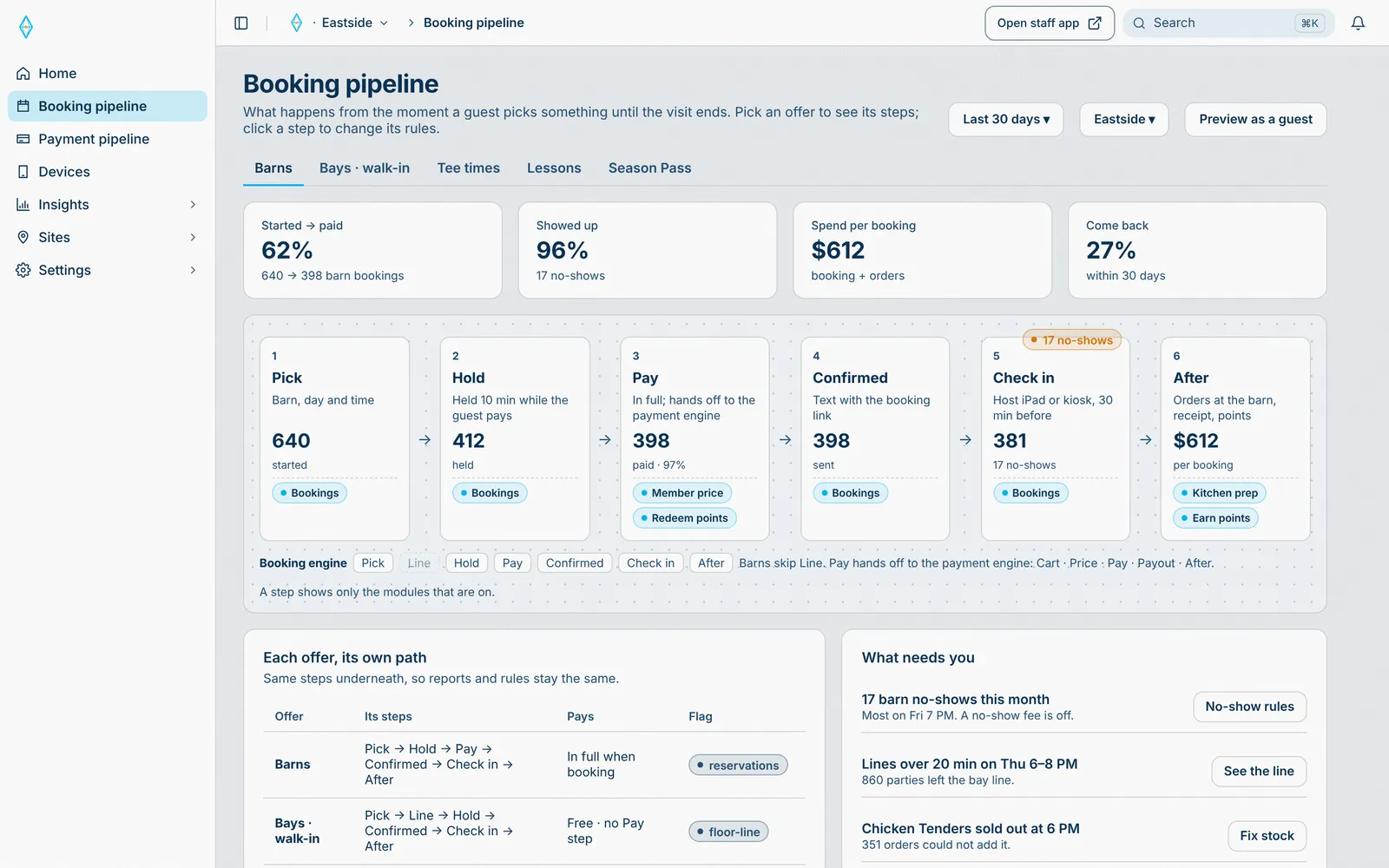
Starts in Sede HQ, runs through Booking engine, lands on Guest phone and Host iPad.
Every offer on every site follows the stages you set.
- 02 · HQ
Offers
Walk-in bays, barn bookings, tee times, lessons, and passes. Each offer has its own rules.
One list of offers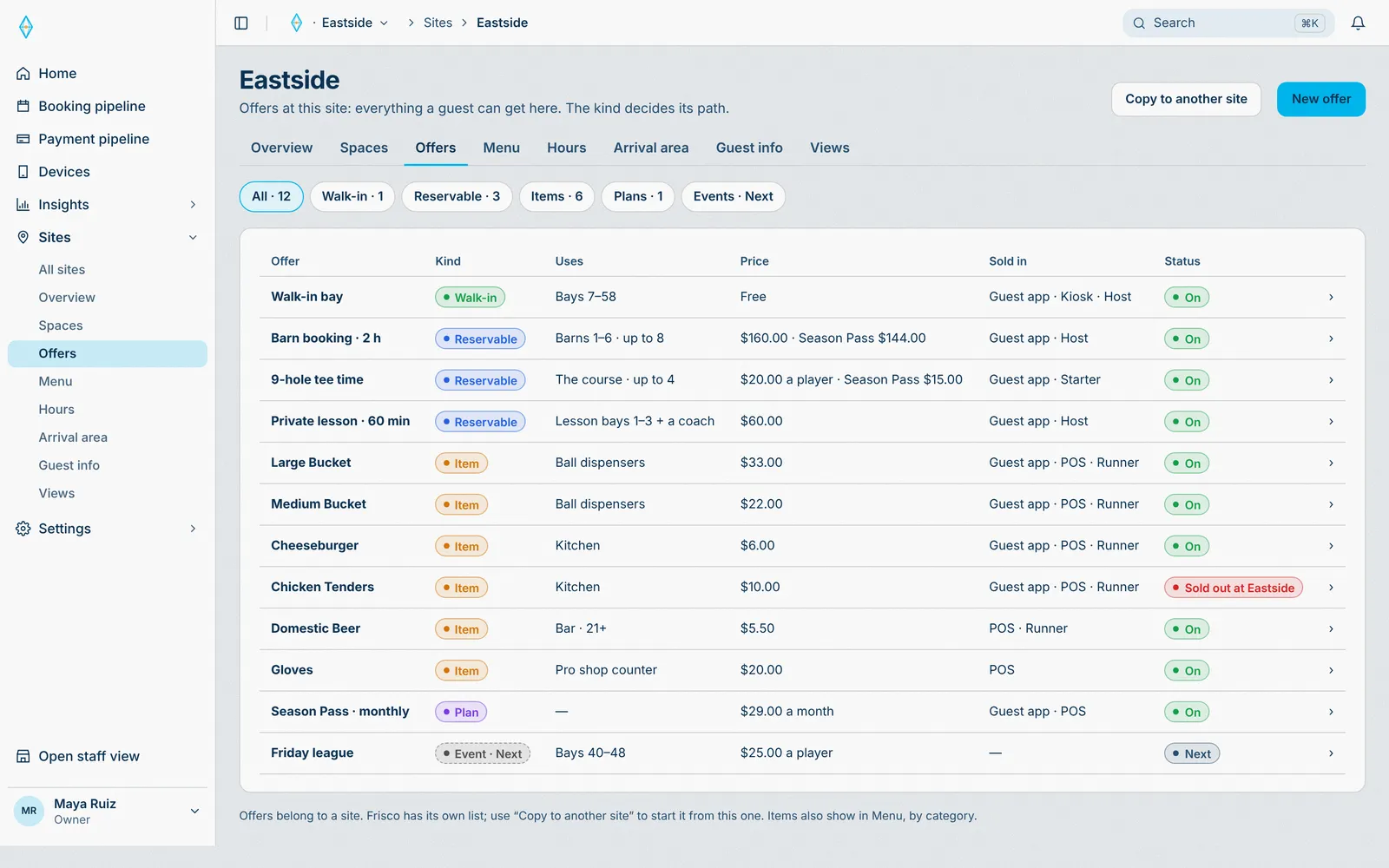
Starts in Sede HQ, runs through Booking engine, lands on Guest phone and Host iPad.
The guest app and the POS show only the offers that are on.
- 01 · HQ
The payment engine
Cart, price, pay, and payout, on your own Stripe account.
Payments on your Stripe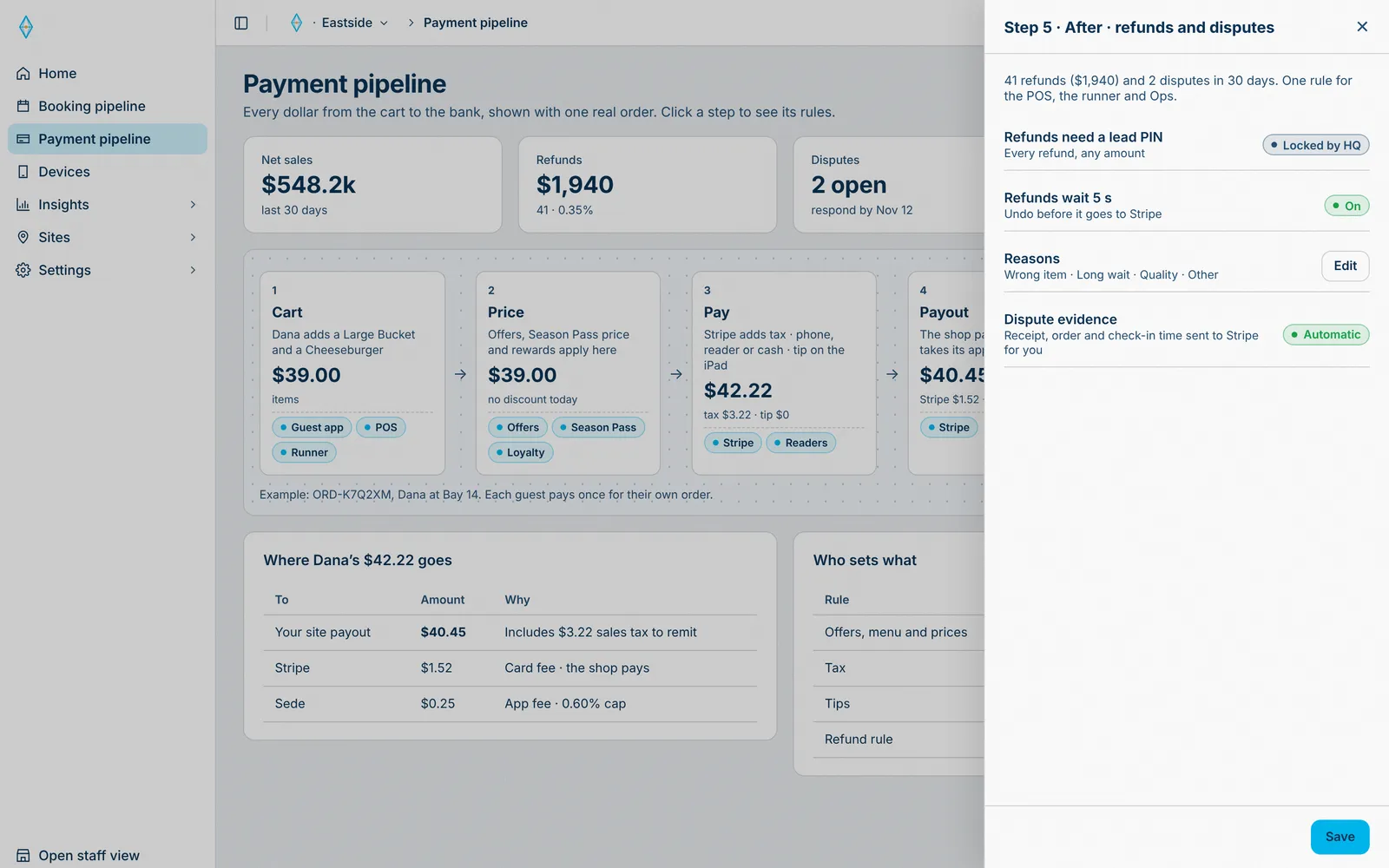
Starts in Sede HQ, runs through Payment engine, lands on Guest phone and POS iPad.
The POS, guest checkout, and refunds all follow the same rules.
- 02 · HQ
Checkout and tenders
QR pay, Apple Pay, Google Pay, card readers, and cash, with tax from Stripe.
Every way to pay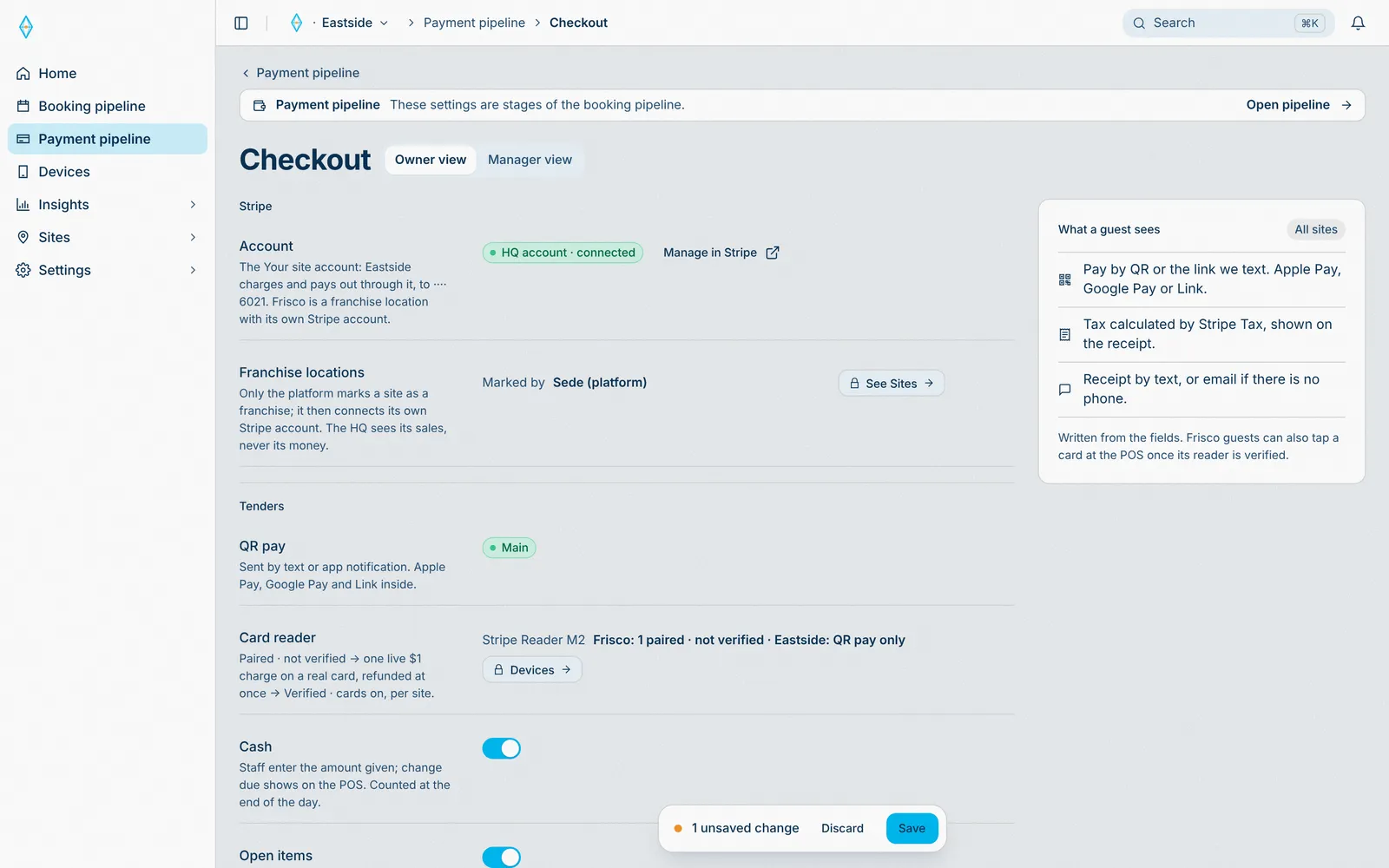
Starts in Sede HQ, runs through Payment engine, lands on Guest phone and POS iPad.
The POS and the guest app offer the tenders you turn on.
- 03 · Manager
Refunds need a lead PIN
Every refund, comp, and void waits for a lead PIN.
Approvals built in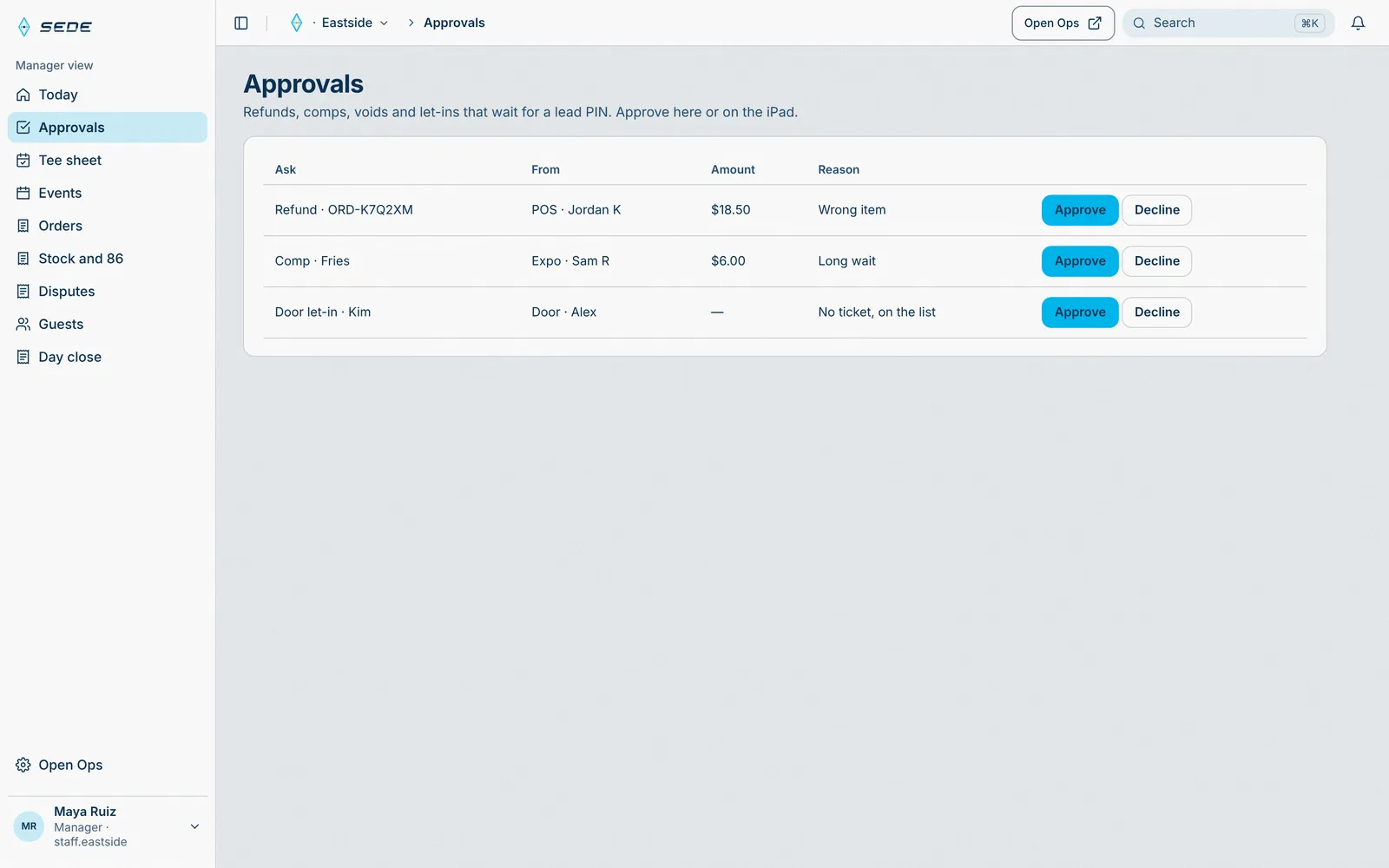
Starts in Sede HQ, runs through Payment engine, lands on POS iPad.
The decision posts to the order and the audit trail.
- 01 · HQ
The network, as a map
Every iPad, reader, and printer, and how they connect.
Hardware you can see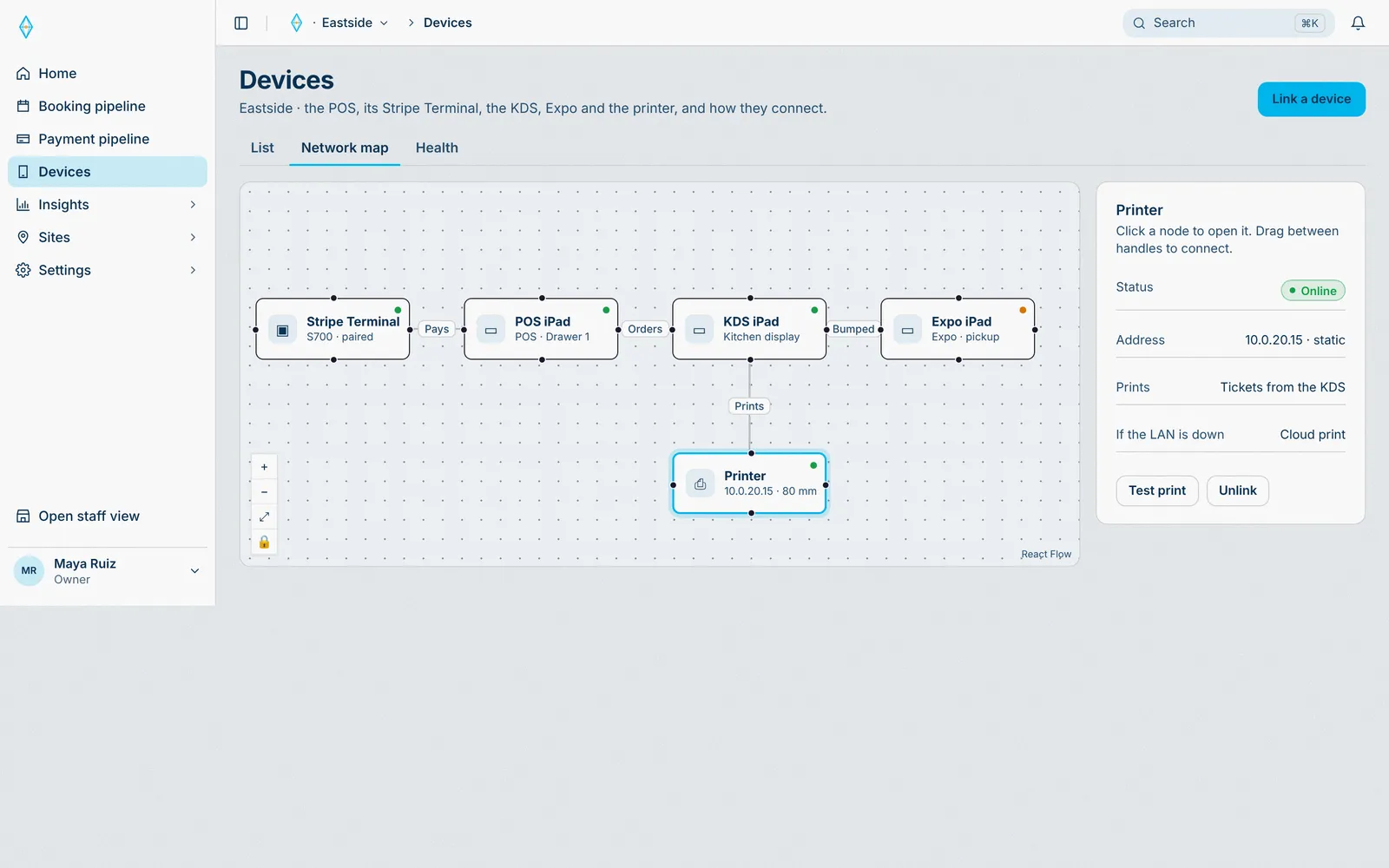
Starts in Sede HQ, runs through Payment engine, lands on Staff iPads and Kitchen display.
Each iPad, reader, and printer reports its status.
- 01 · Guest
Order from the bay or table
Scan the QR at the bay or table and order. No app.
One menu for the site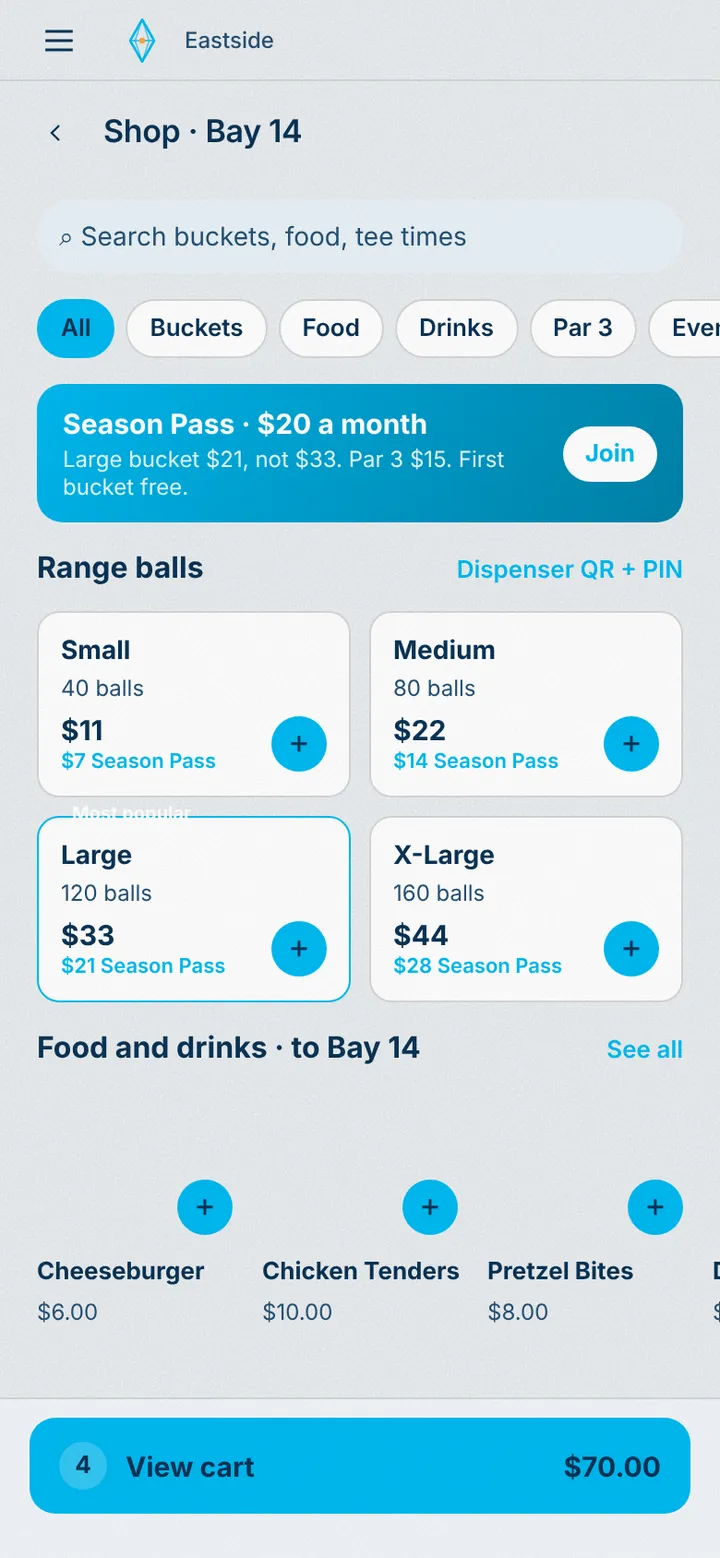
Starts in Sede HQ, lands on Guest phone.
The menu reads live stock. 86’d items disappear.
- 02 · Guest
One cart, one payment
Pay once. Each station gets its own ticket.
Every station gets its ticket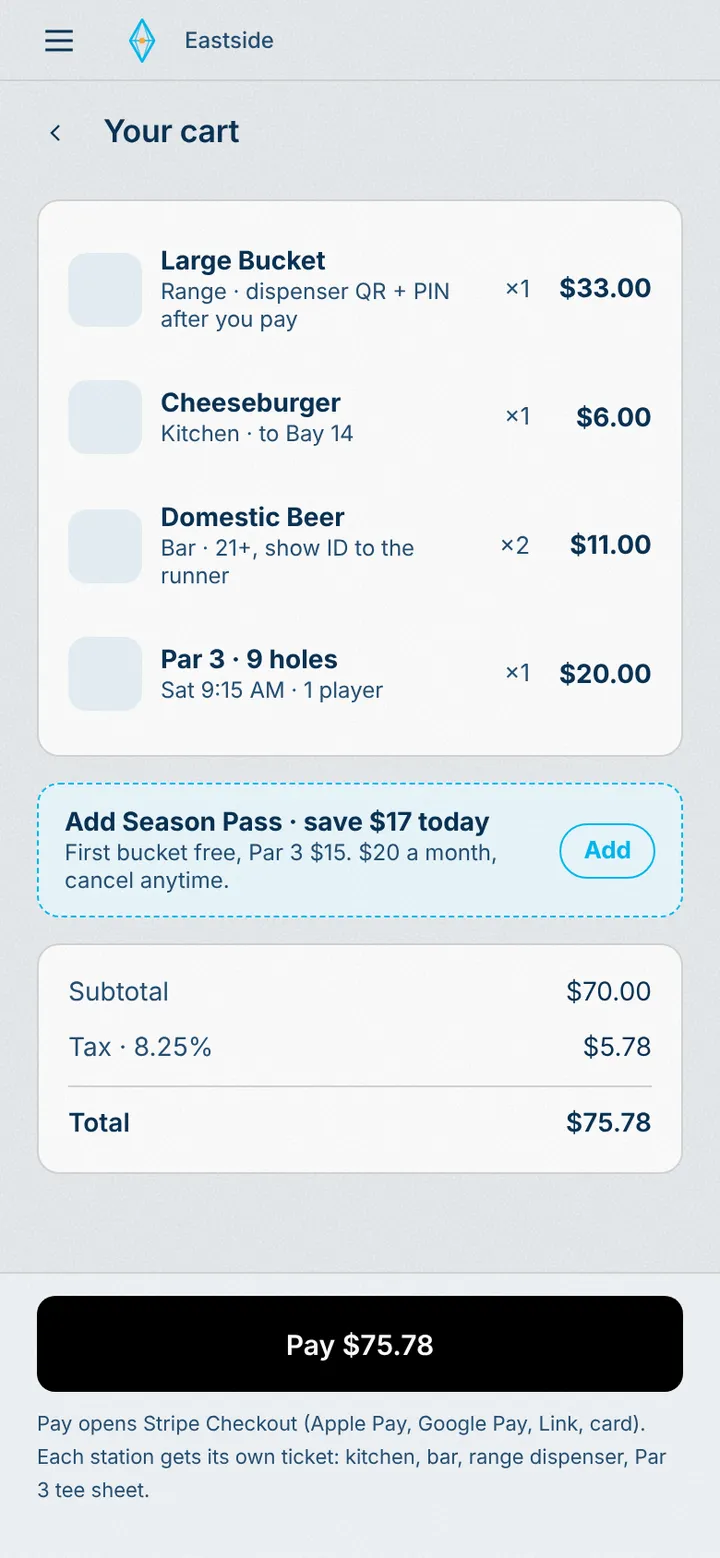
Starts in Guest app, runs through Payment engine, lands on Kitchen display, Expo iPad, and Insights.
One payment. Each item becomes a ticket for its station.
- 03 · Kitchen
The kitchen gets the ticket
Routed by station. Late tickets flag themselves.
Late tickets flag themselves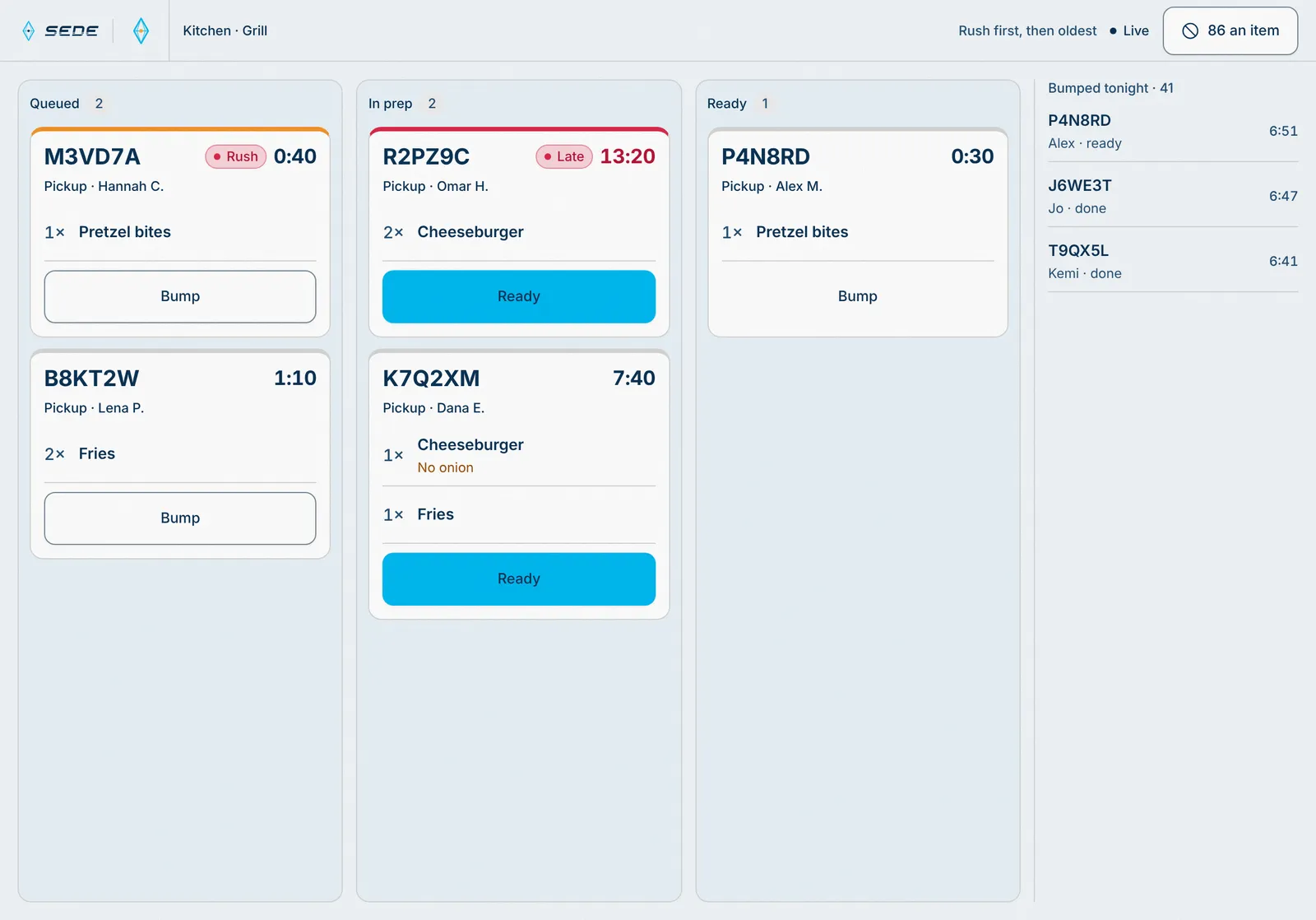
Starts in Staff app, runs through Payment engine, lands on Expo iPad and Insights.
The ticket timer runs. Late tickets flag on Expo and in Today.
- 04 · Expo
Expo hands it off
Ready orders wait by code. The guest gets a text, and anything not picked up is flagged.
Ready texts, by code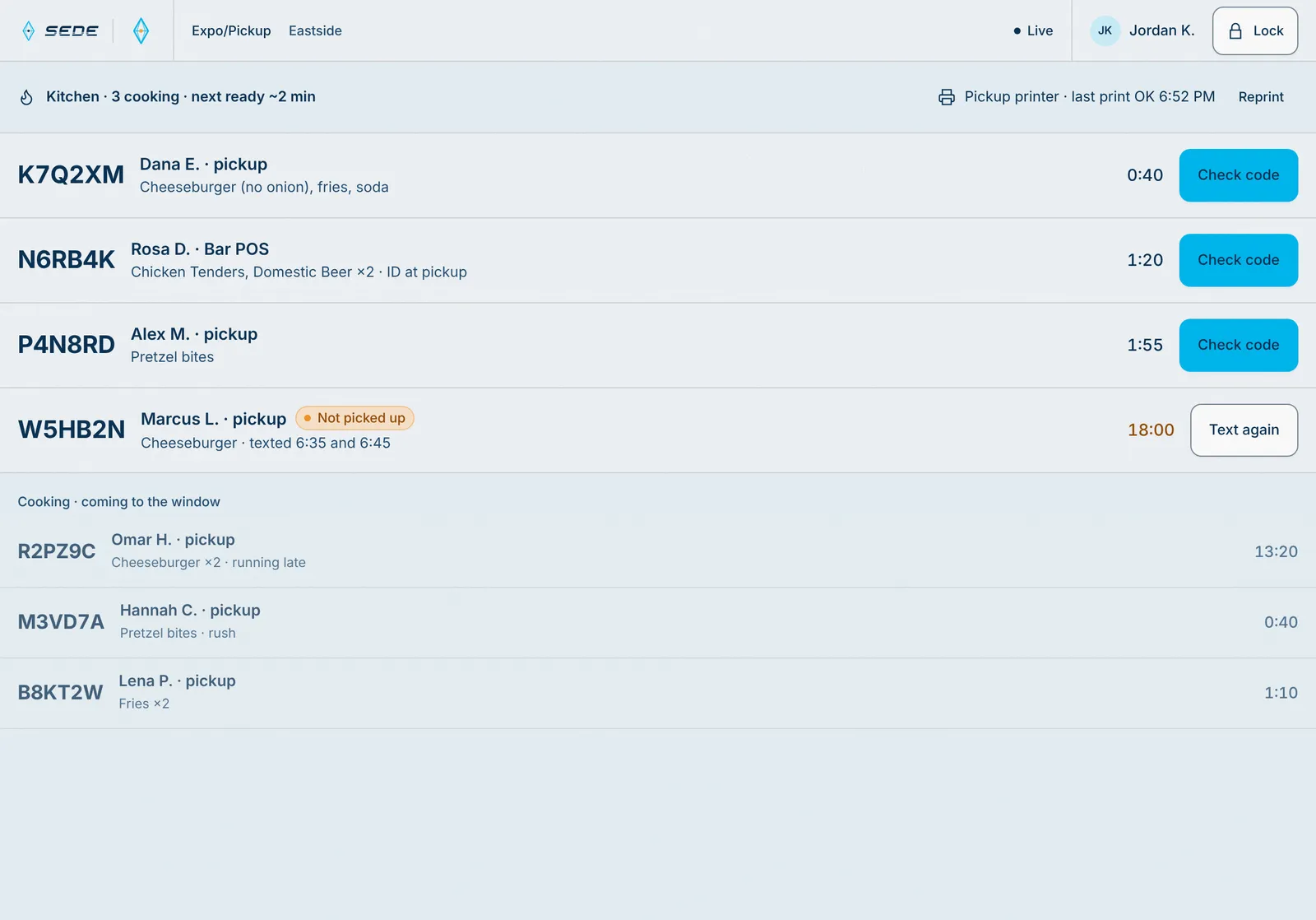
Starts in Staff app, runs through Payment engine, lands on Guest phone and Insights.
The guest gets a ready text. The HQ counts the ticket time.
- 05 · Insights
It shows up in insights
Every sale, live, as it happens.
Insights from every sale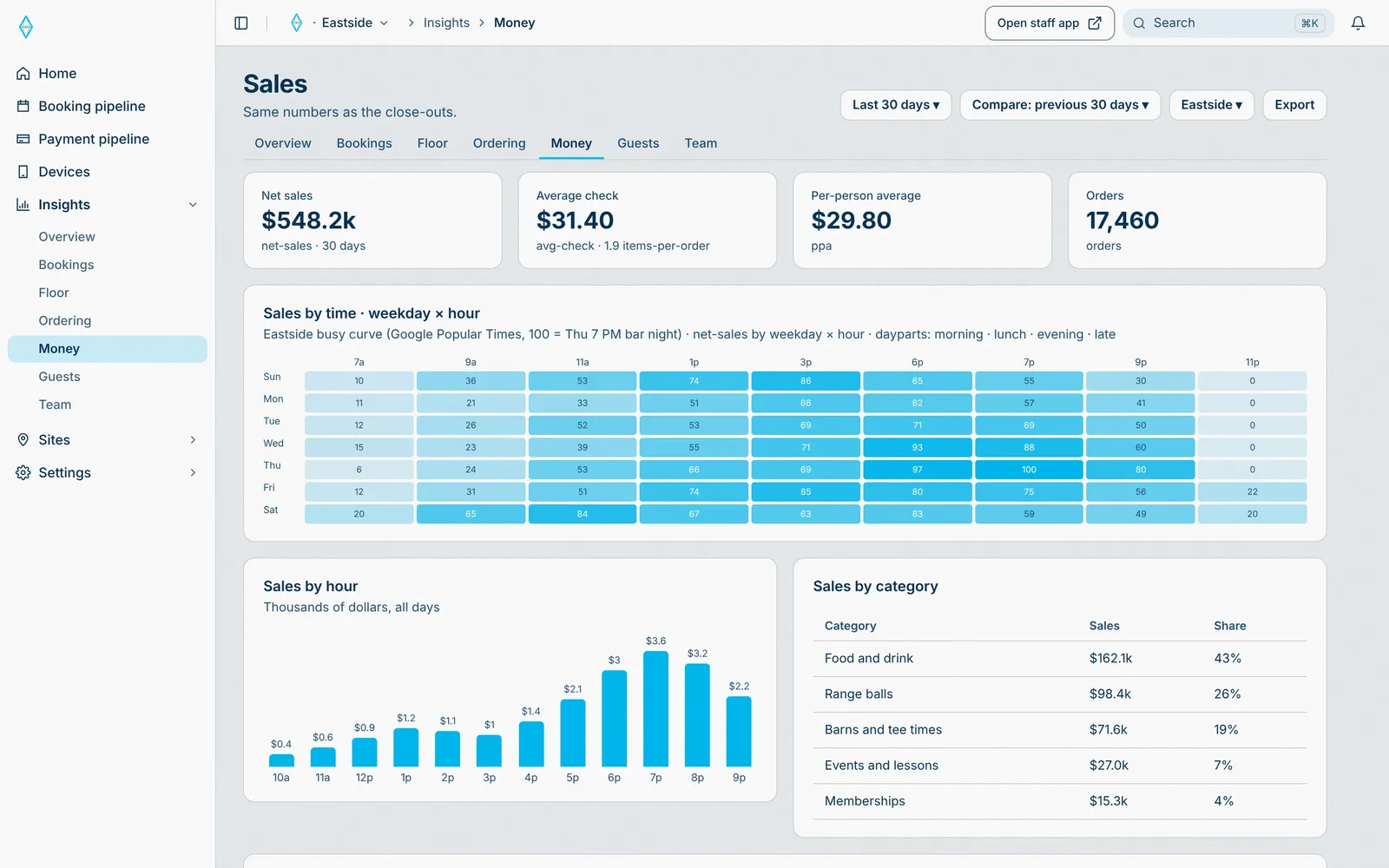
Starts in Sede HQ, runs through Payment engine, lands on Insights.
Every sale lands in insights as it happens.
- 01 · Staff
Any iPad is a POS
Sell items, passes, and memberships. A membership is paid from a texted link.
Sell anywhere on the floor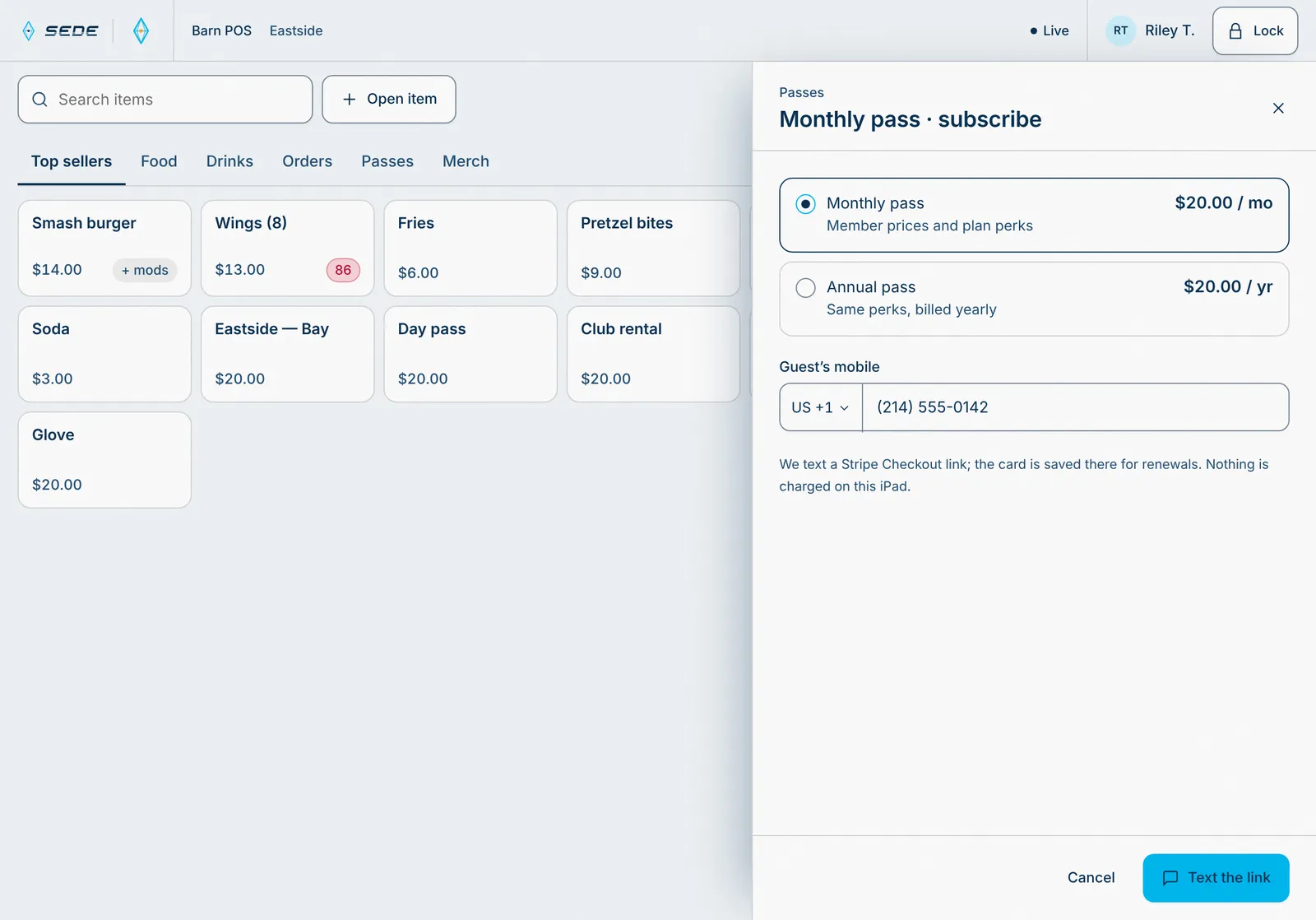
Starts in Staff app, runs through Payment engine, lands on Guest phone and Insights.
The sale posts to the HQ. The plan attaches to the guest.
- 02 · Staff
The internet drops. The POS doesn’t.
Sales save on the iPad and send by themselves when it is back.
Keeps selling offline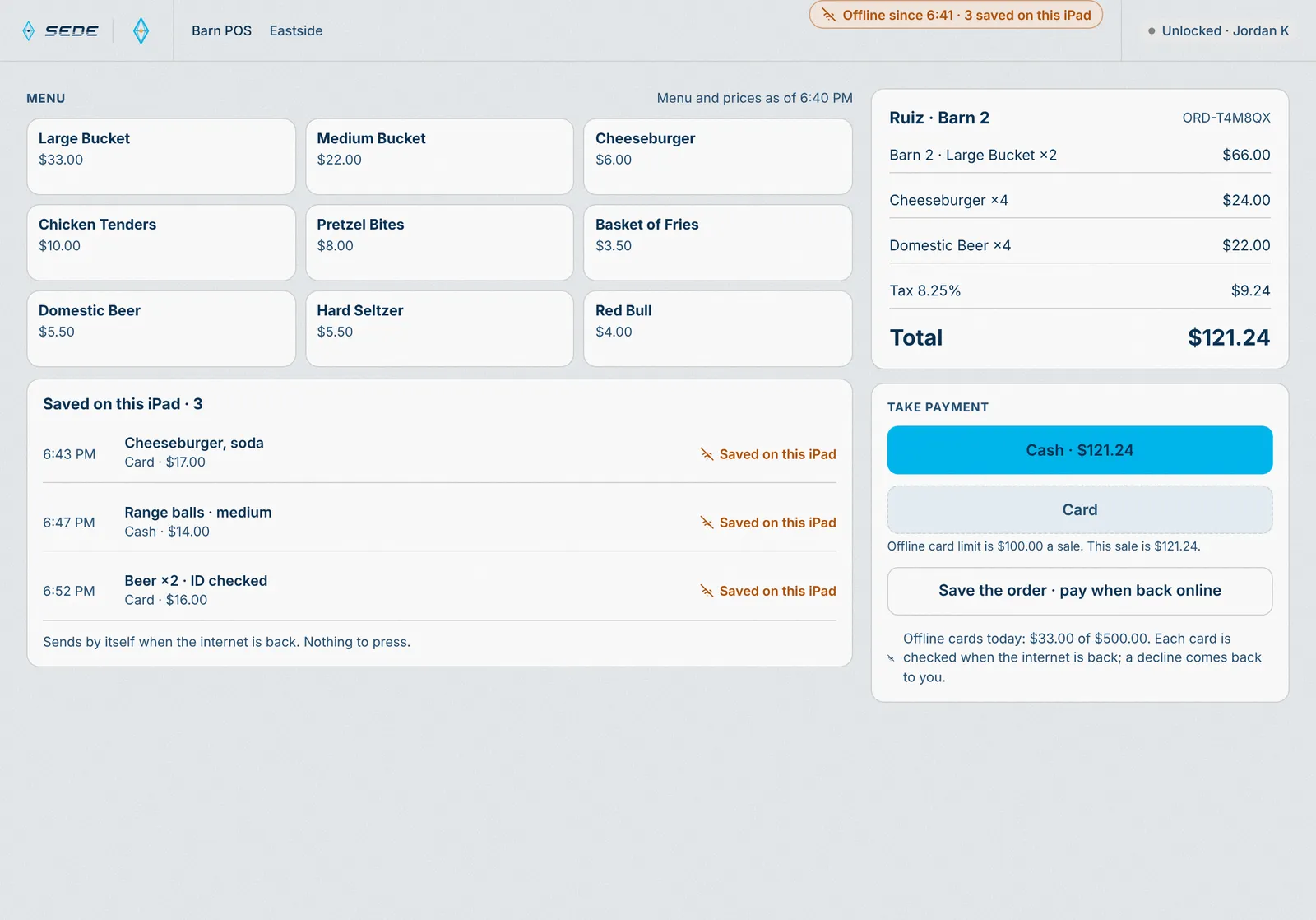
Starts in Staff app, runs through Payment engine, lands on Insights.
Saved sales send in order when the network is back.
- 01 · Guest
Join the line
Scan the QR. No app, no password.
No app to download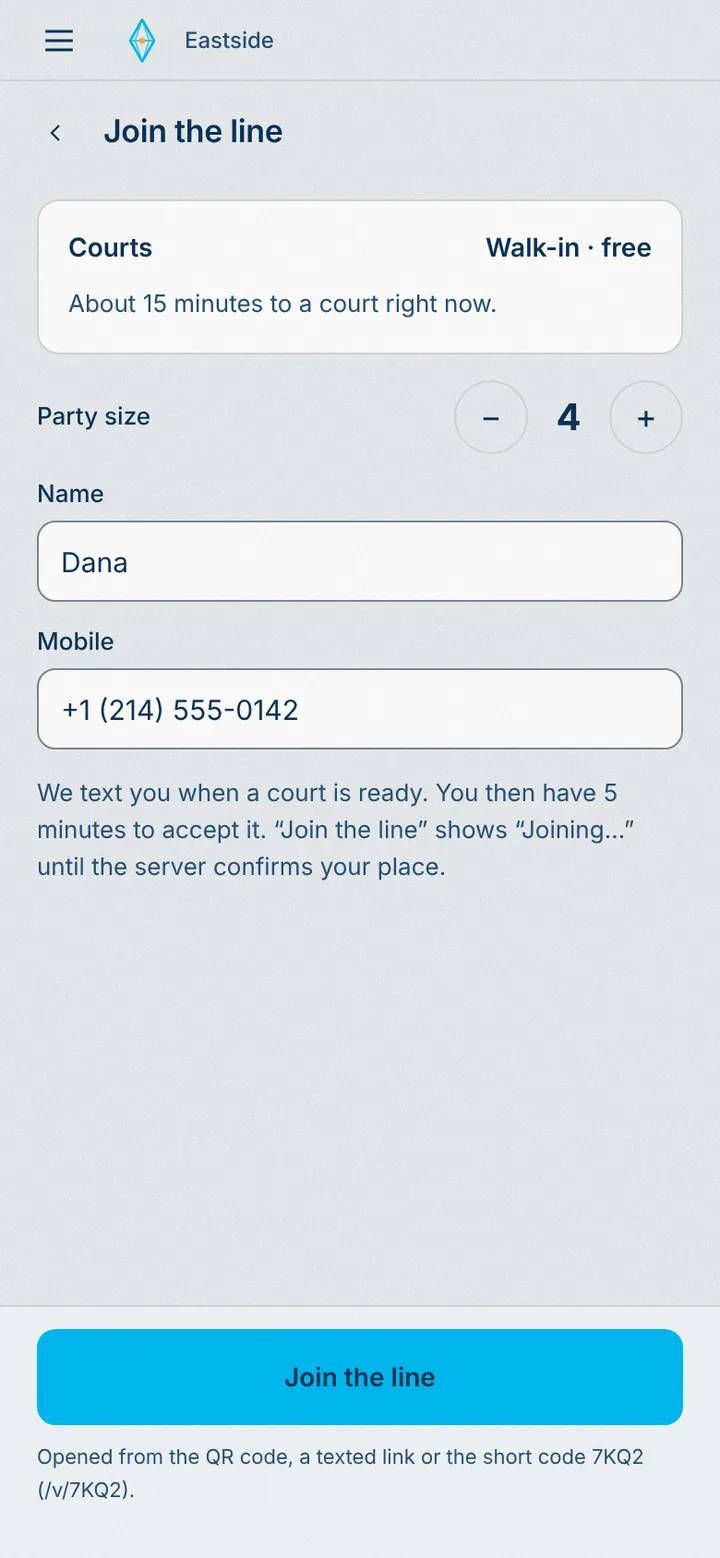
Starts in Guest app, runs through Booking engine, lands on Host iPad and Insights.
The party joins the line. The host sees it.
- 02 · Guest
Their court is ready
Offered in the order they joined. A text, and five minutes to accept.
First come, first served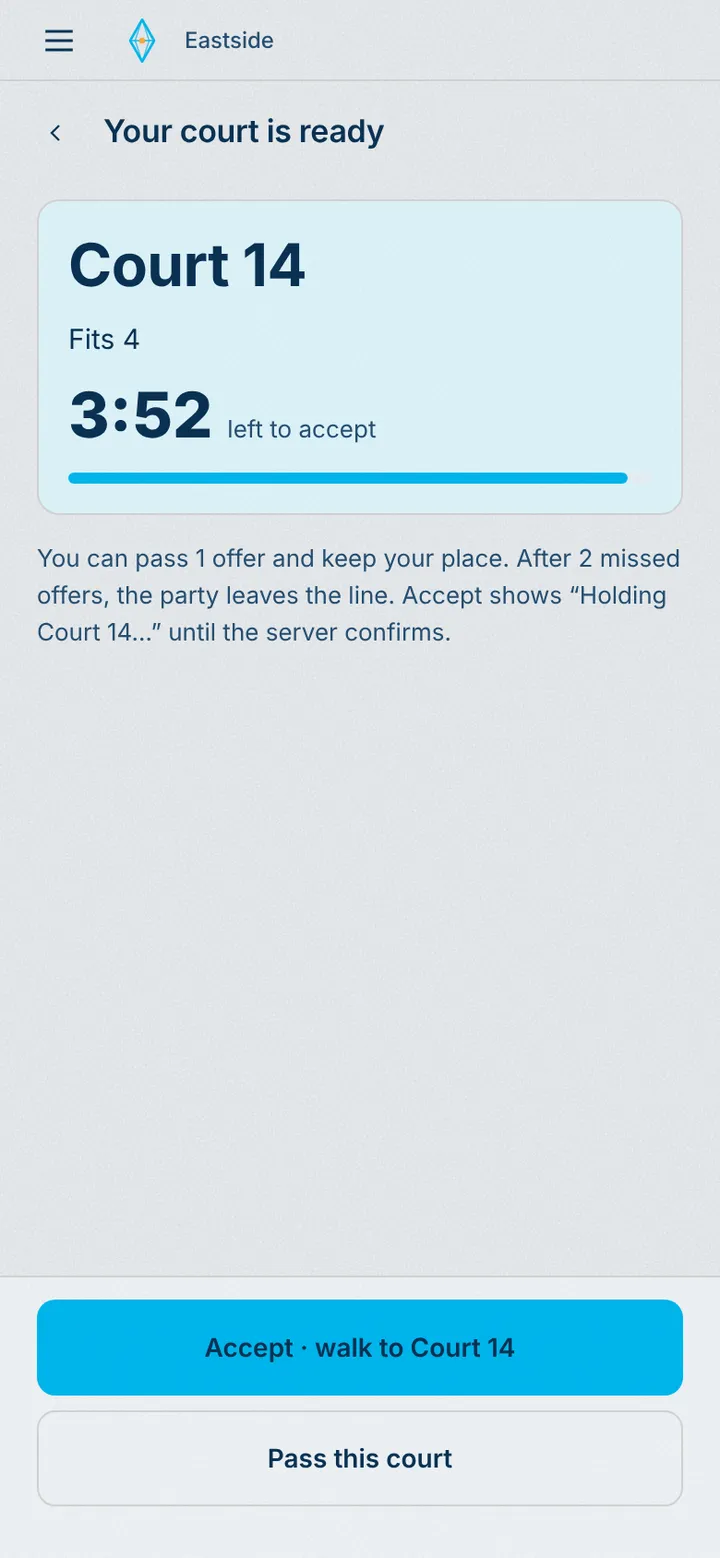
Starts in Staff app, runs through Booking engine, lands on Guest phone.
The court is held for them while the timer runs.
- 03 · Host
Seated on the floor map
The next open court goes to the next party in line. Nobody runs a list.
The line fills courts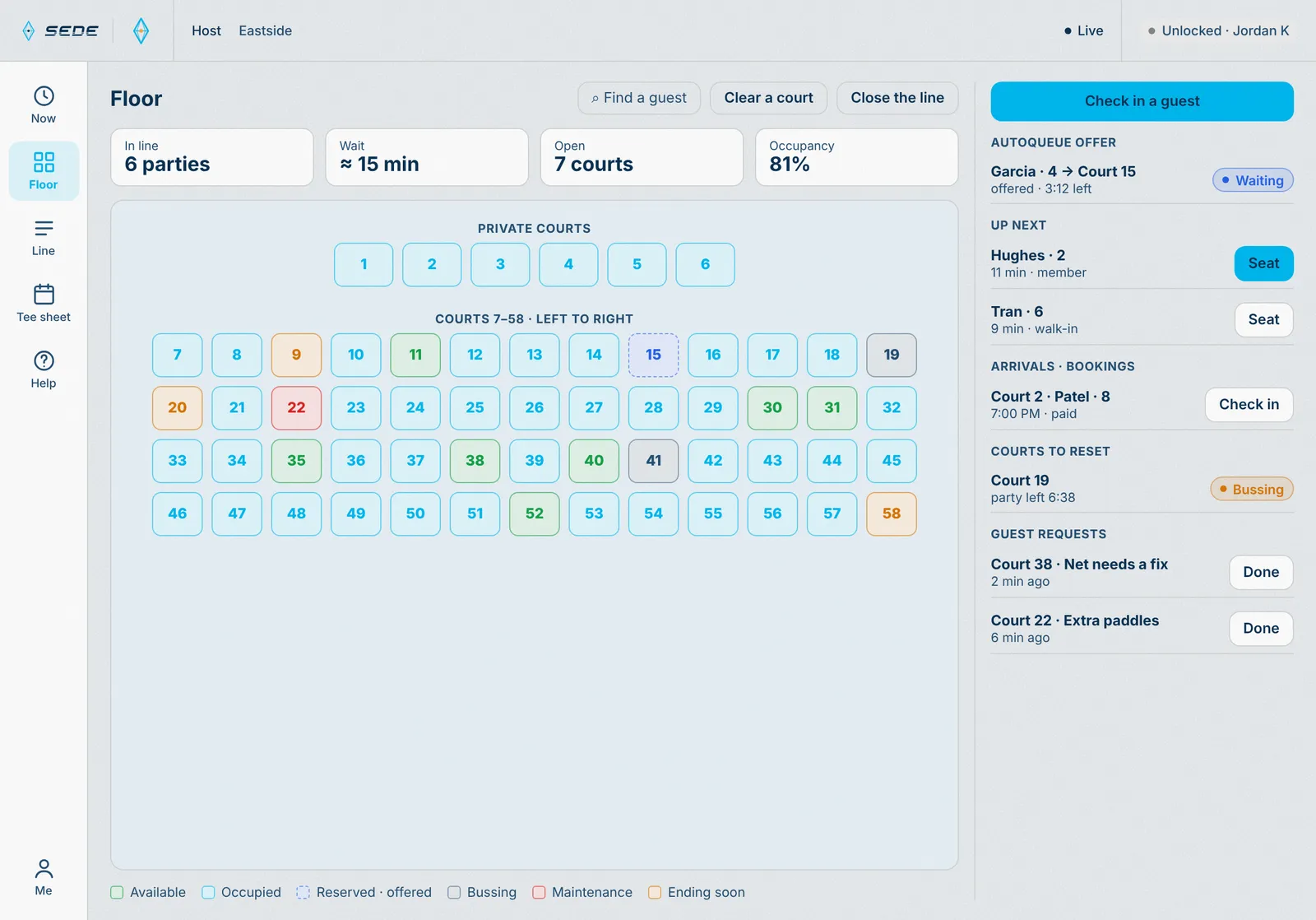
Starts in Staff app, runs through Booking engine, lands on Guest phone and Insights.
Court status changes on every floor map and in Today.
- 01 · Guest
Reserve and pay
Pick a resource and a time. It is held for them while they pay.
Held while they pay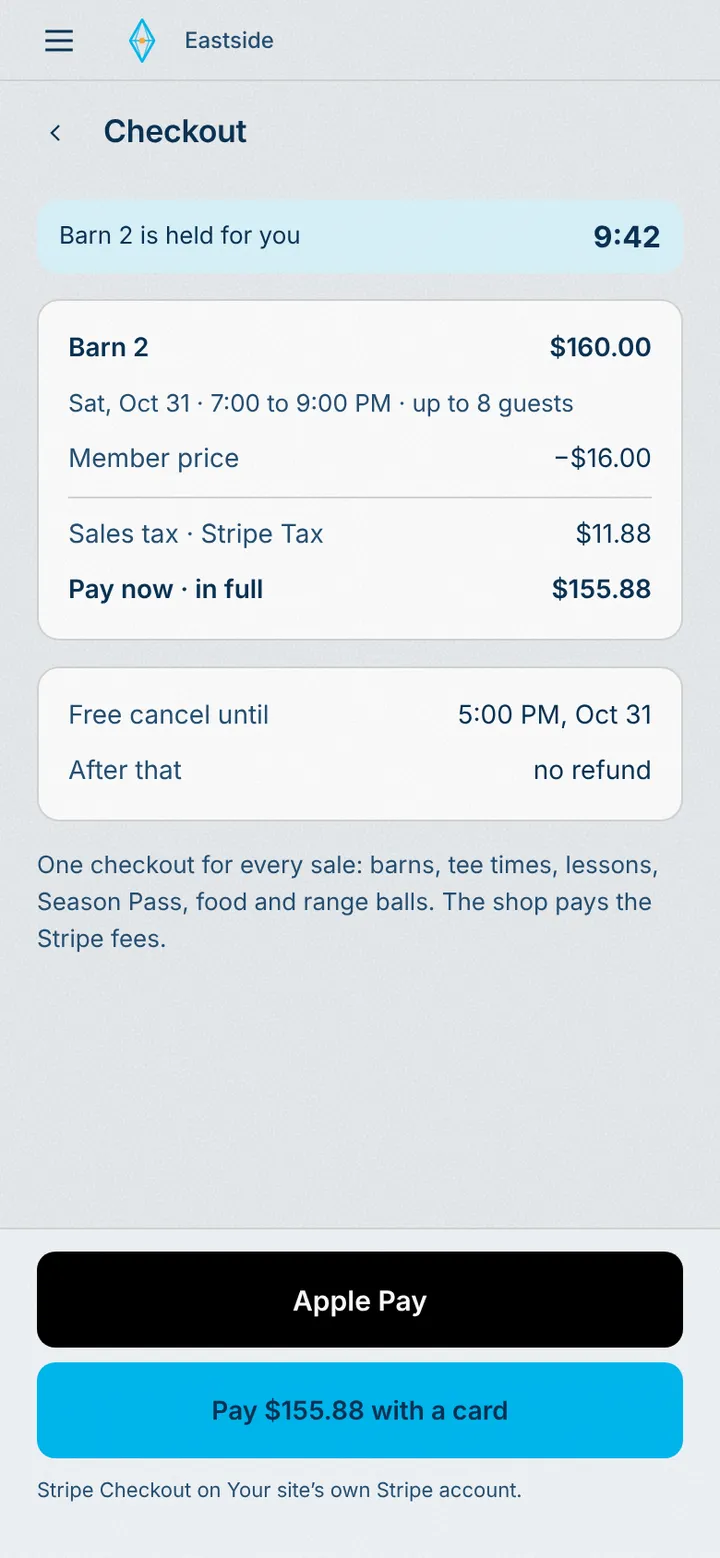
Starts in Guest app, runs through Booking engine and Payment engine, lands on Host iPad and Insights.
The resource is held for this guest on every screen.
- 02 · Guest
Booked
A code for the door, also sent by text. Change or cancel from the link.
Change or cancel by link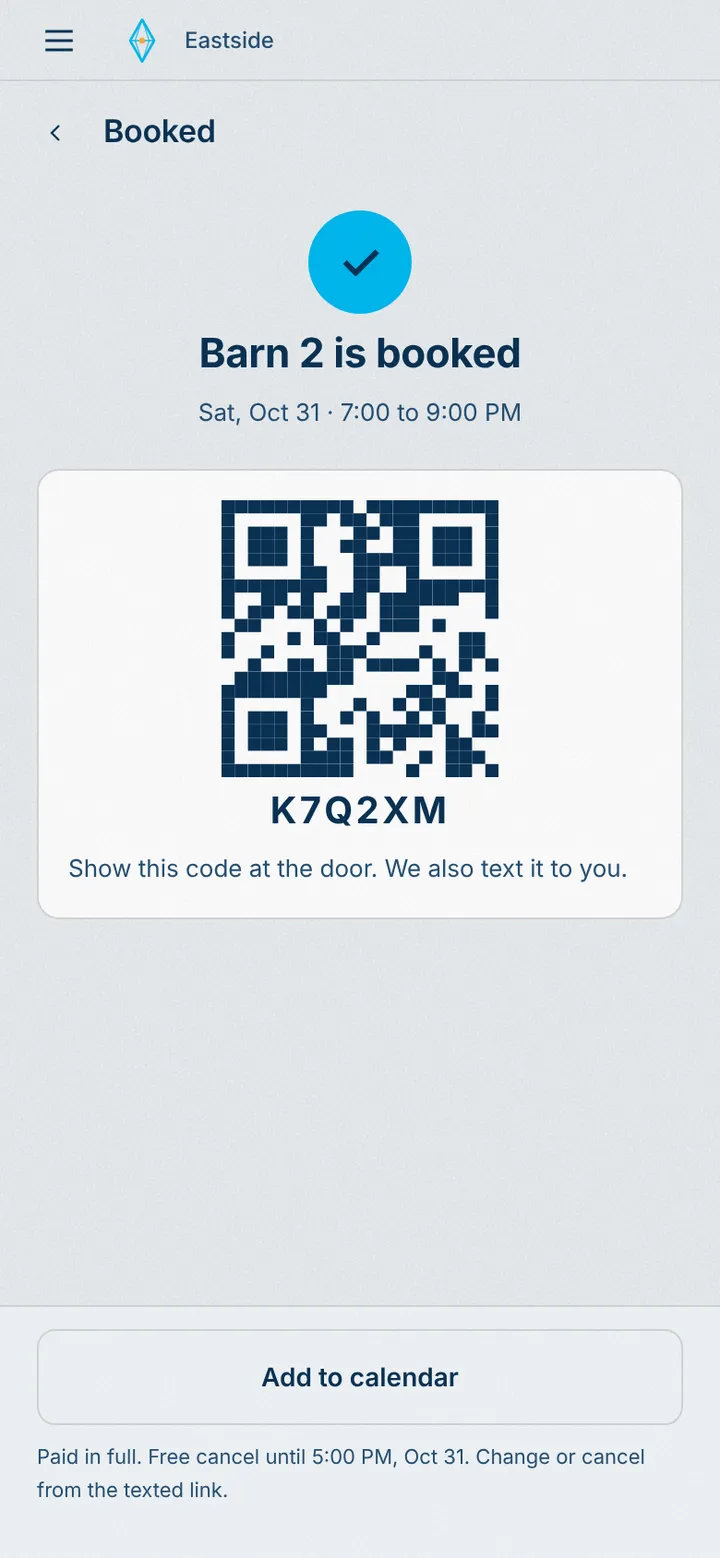
Starts in Guest app, runs through Booking engine and Payment engine, lands on Host iPad and Insights.
The booking lands on the host’s floor map and in the HQ.
- 03 · Guest
Checked in on arrival
Check in by QR, or automatically on arrival in the app.
Check-in on arrival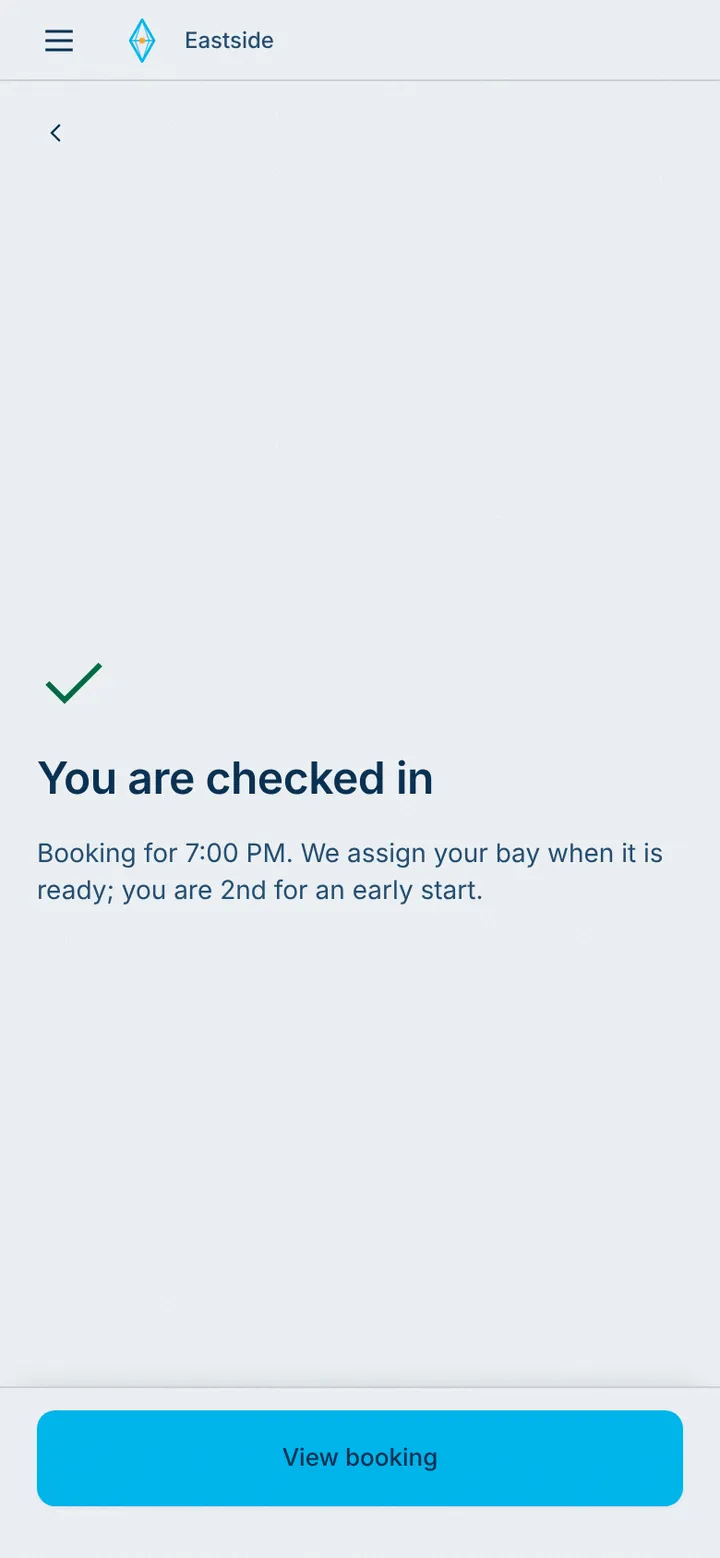
Starts in Guest app, runs through Booking engine and Payment engine, lands on Host iPad and Insights.
Arrival checks them in. The host and the HQ see it.
- 04 · Host
The host sees them arrive
The floor map shows who is here, live.
Every space, live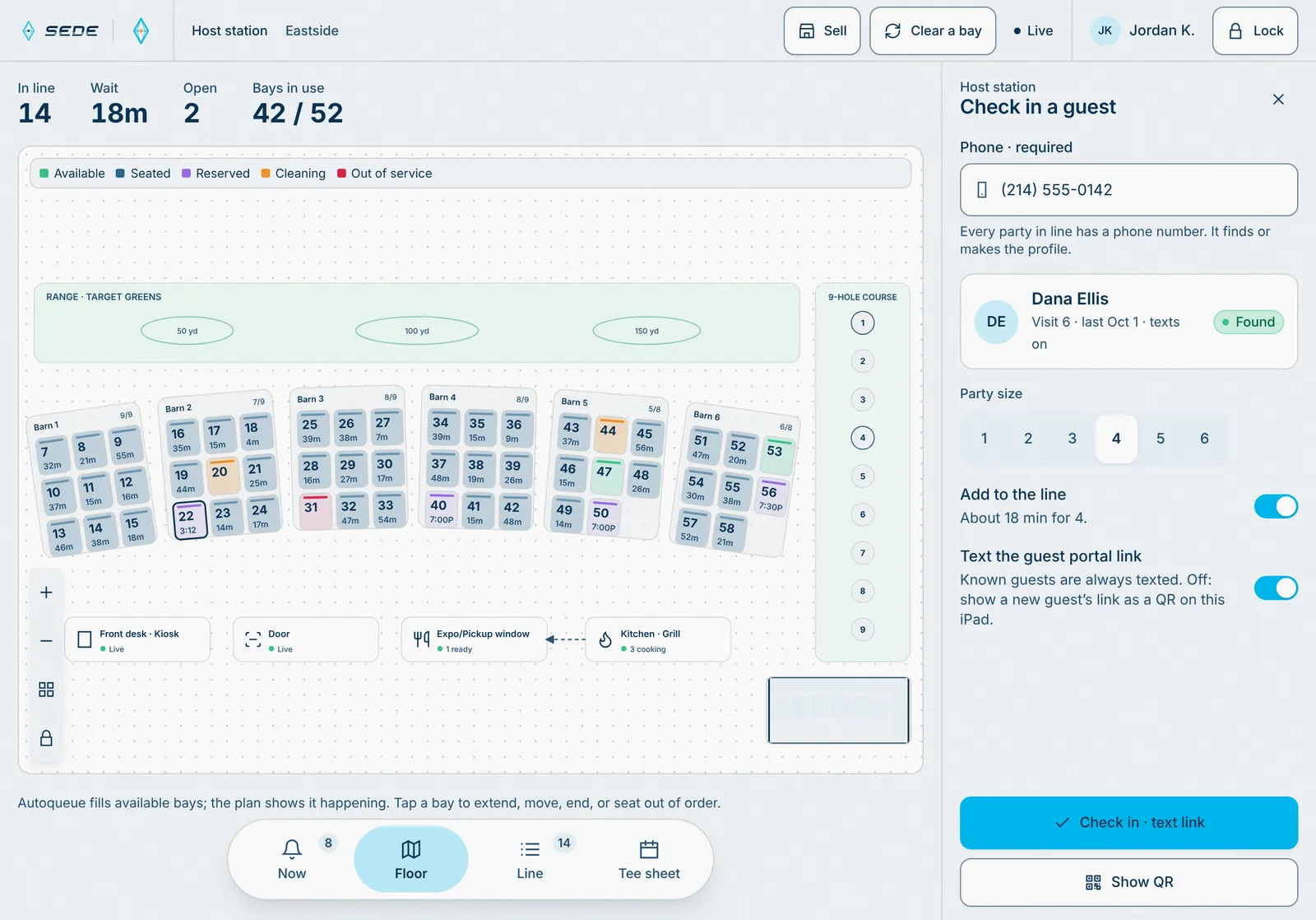
Starts in Staff app, runs through Booking engine and Payment engine, lands on Guest phone and Insights.
The space turns occupied on every floor map.
- 05 · Insights
Know what every space earns
Utilization, spend, and no-shows by space.
Bookings insights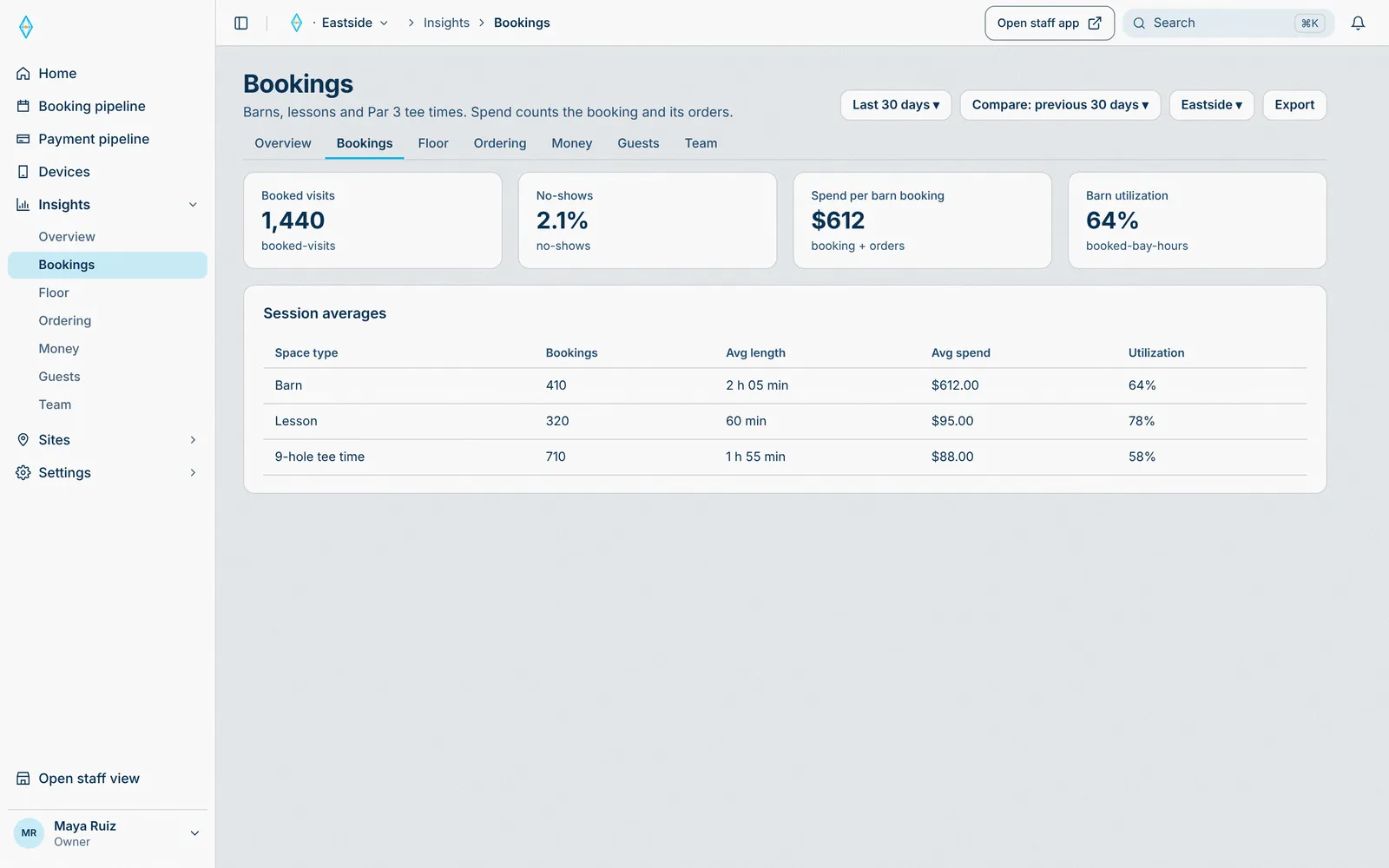
Starts in Sede HQ, runs through Booking engine and Payment engine, lands on Insights.
Every booking rolls up into insights.
- 01 · Guest
Pick a coach and a time
Any coach, or a favourite. The length comes from the offer: an hour, two hours, whatever you sell.
Coach and bay held together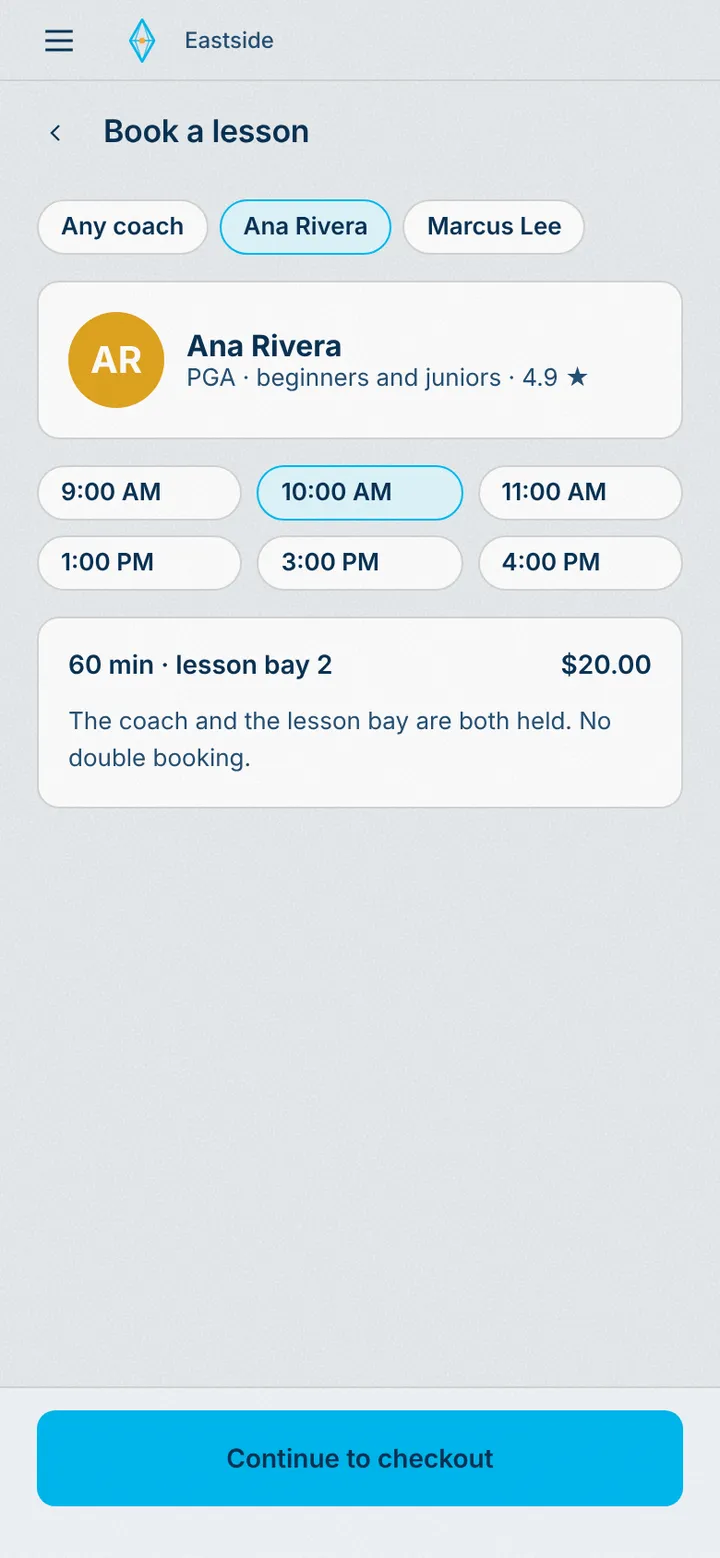
Starts in Guest app, runs through Booking engine and Payment engine, lands on Coach iPad and Insights.
The coach and a lesson bay are held together.
- 02 · Guest
Lesson booked
Coach and lesson bay, booked together.
No double booking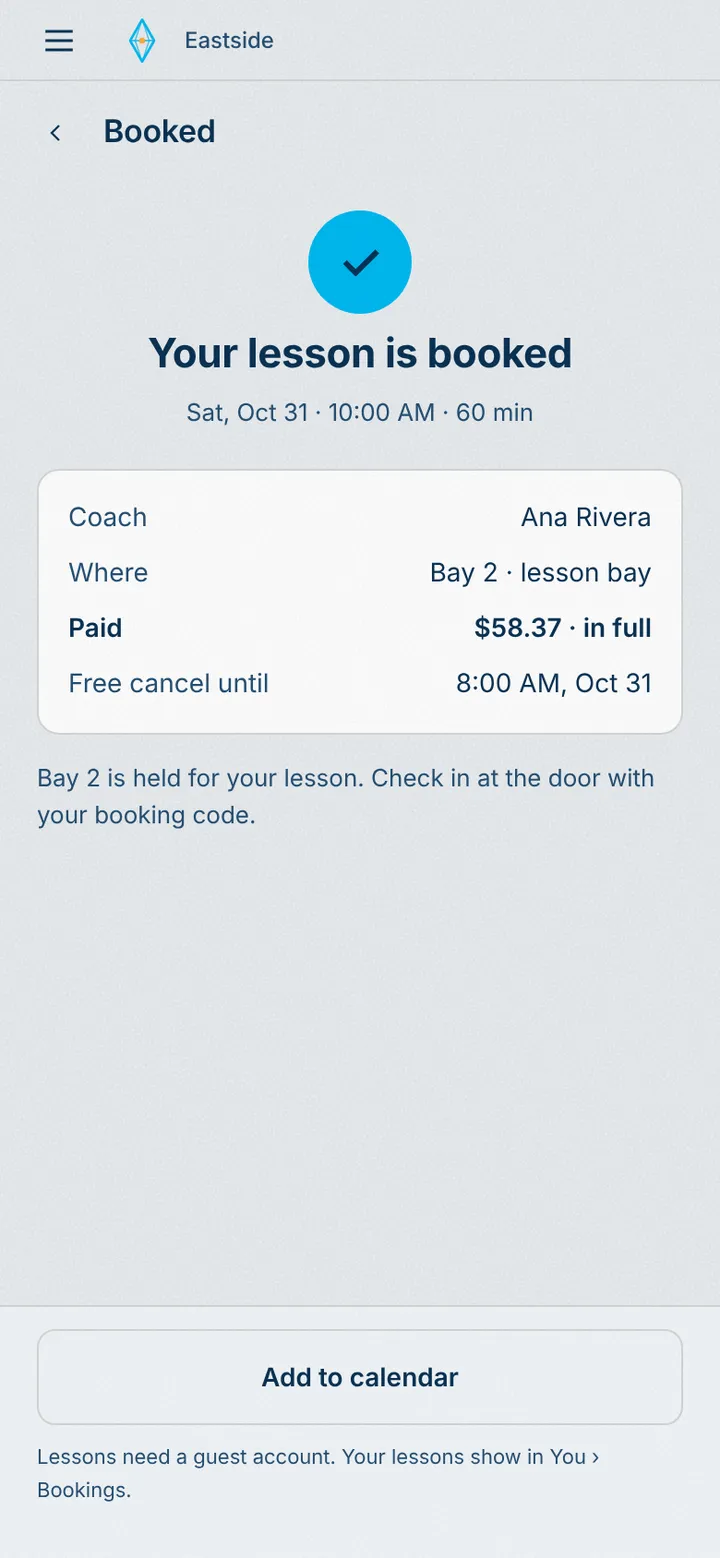
Starts in Guest app, runs through Booking engine and Payment engine, lands on Coach iPad and Insights.
The coach’s list and the schedule update at once.
- 03 · Coach
The coach sees it
Today’s lessons, with one-tap check-in.
One-tap check-in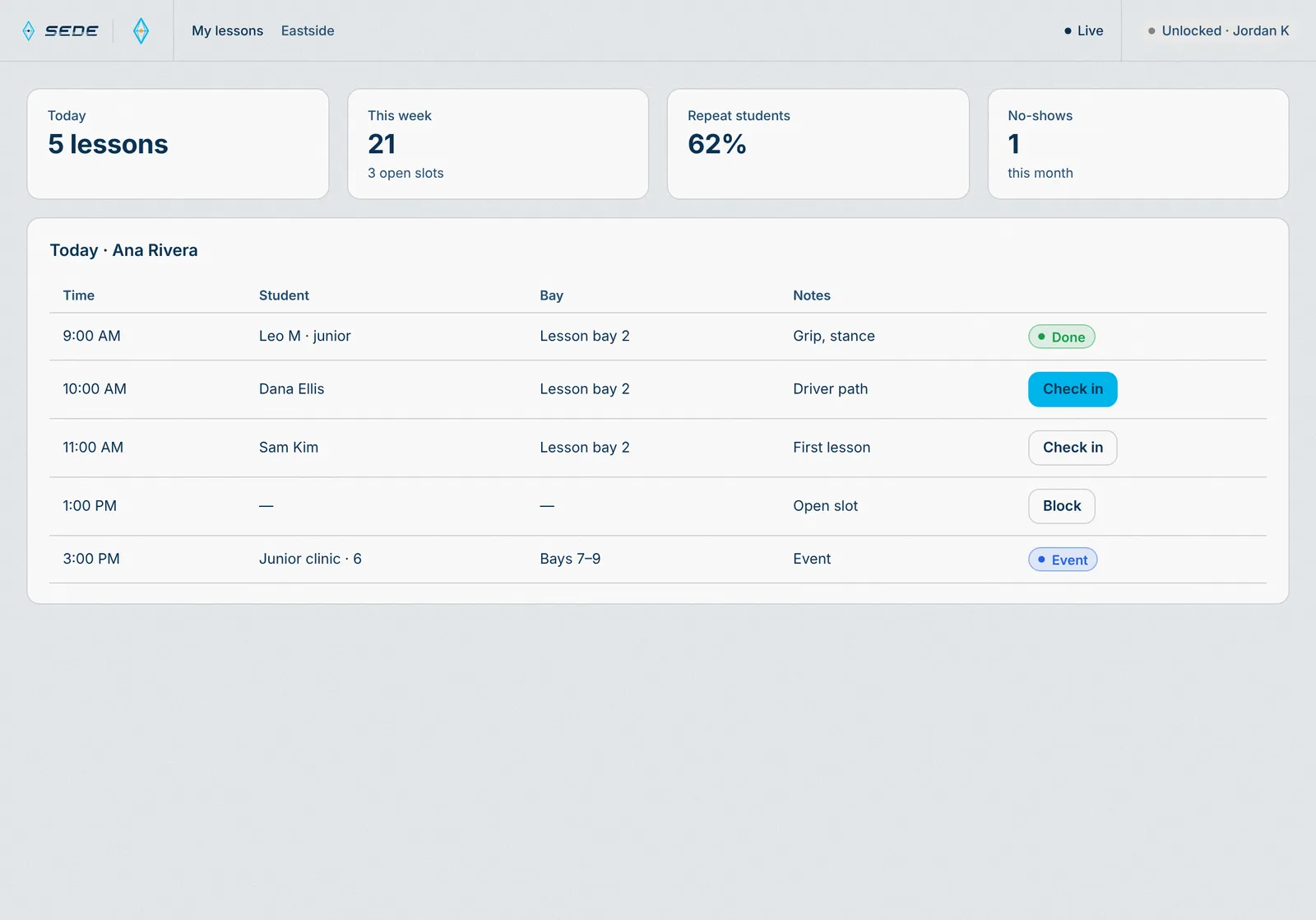
Starts in Staff app, runs through Booking engine and Payment engine, lands on Insights.
The lesson starts and the bay shows occupied.
- 01 · Guest
Get tickets
Seats are held while they pay.
Seats held at checkout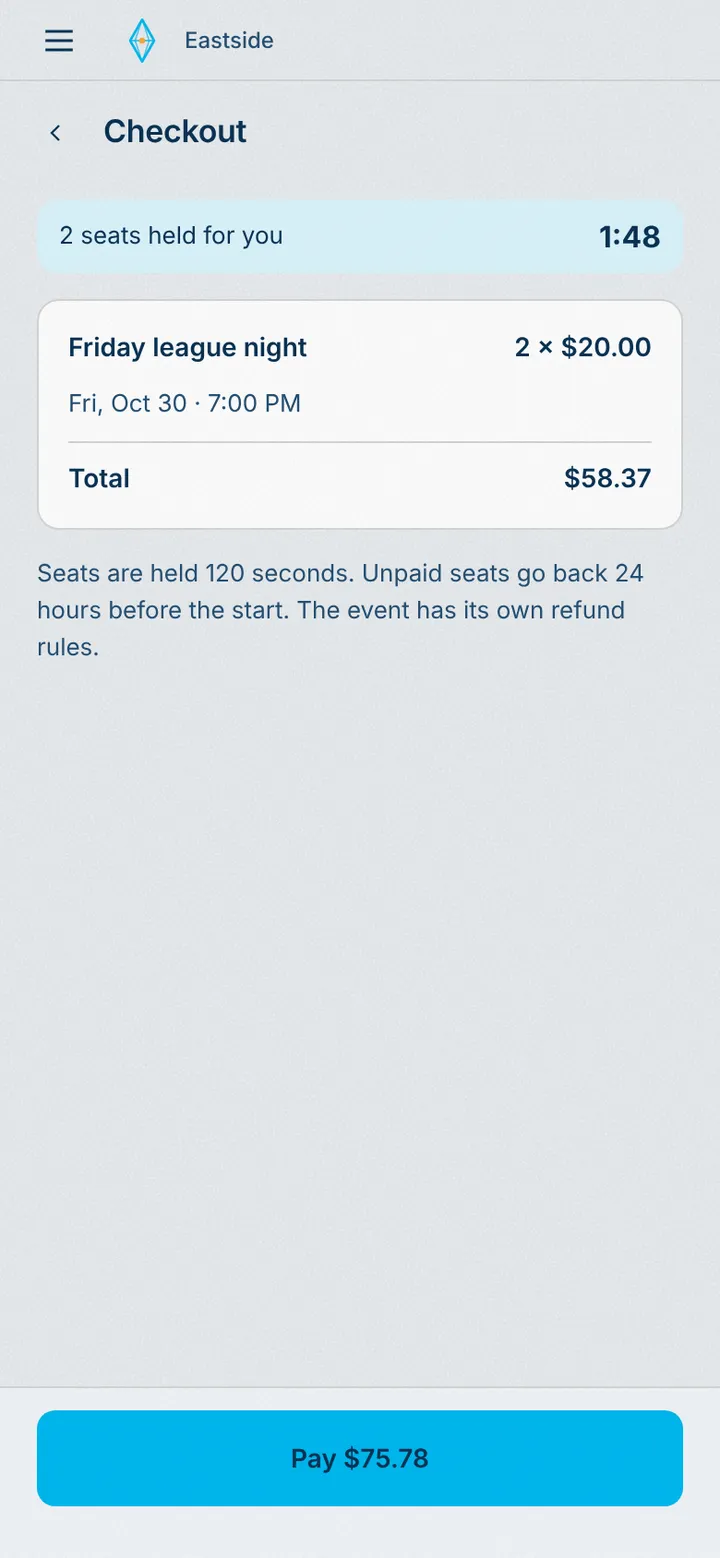
Starts in Guest app, runs through Booking engine and Payment engine, lands on Insights.
Seats hold for this guest while they pay.
- 02 · Guest
The ticket
A QR for the door, also sent by text. Transferable.
Transferable tickets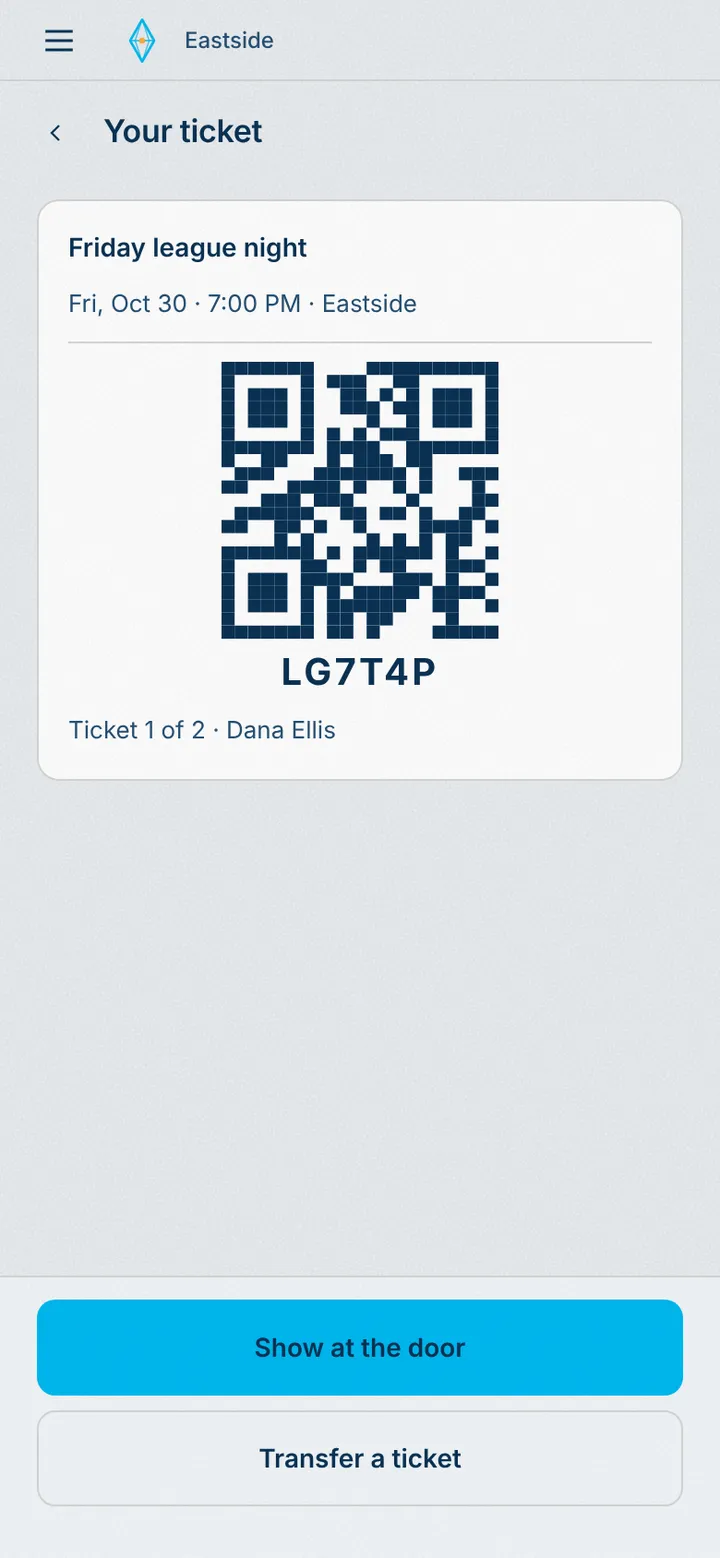
Starts in Guest app, runs through Booking engine and Payment engine, lands on Door iPad and Insights.
The ticket is on the door list the moment it is paid.
- 03 · Door
Check them in at the door
Scan in, and let standby in as seats open.
Standby handled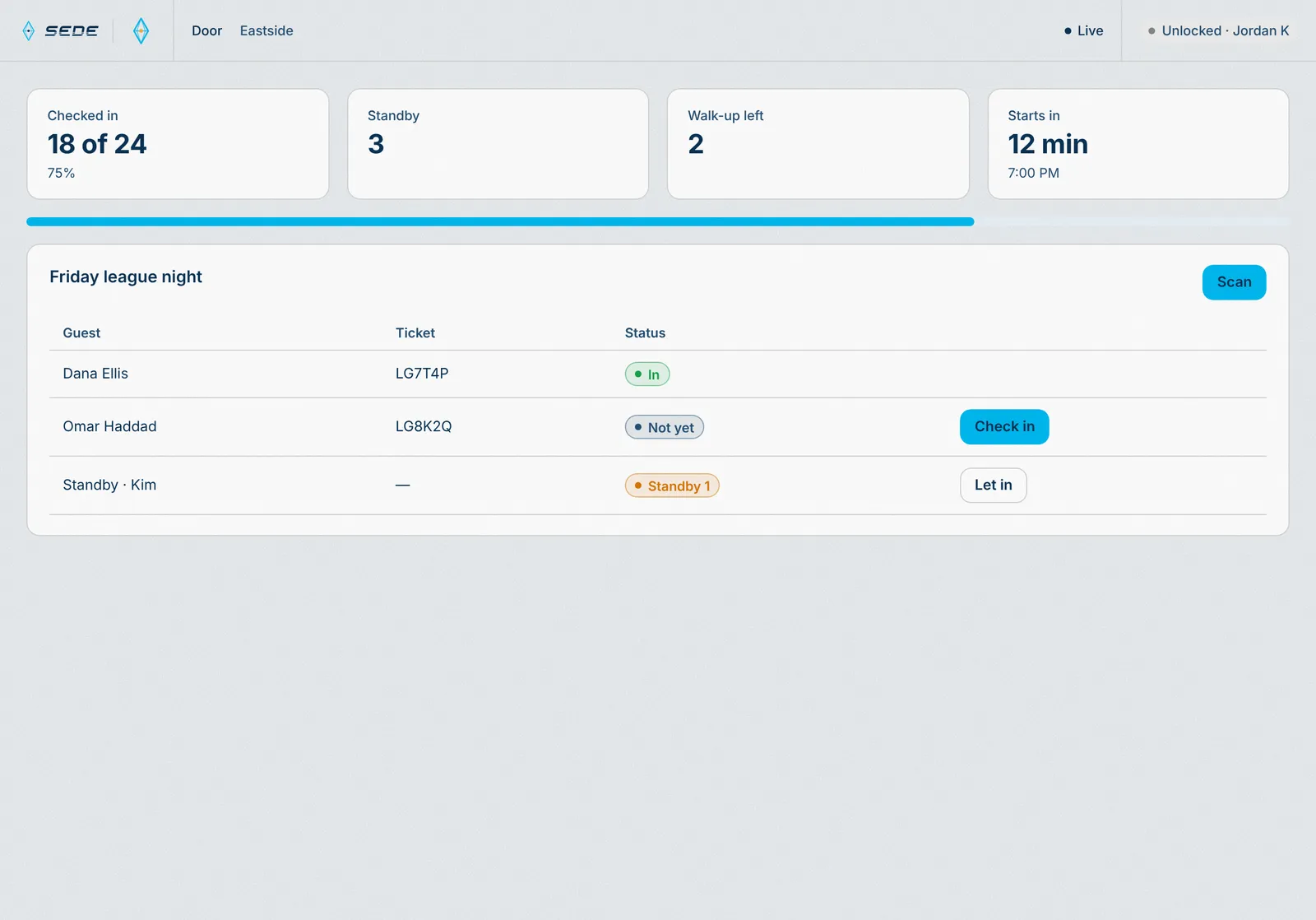
Starts in Staff app, runs through Booking engine and Payment engine, lands on Guest phone and Insights.
Door counts update live. Standby moves up as seats open.
- 01 · Guest
Sign on their phone
Every adult signs before they play. Coming soon.
Waivers · coming soon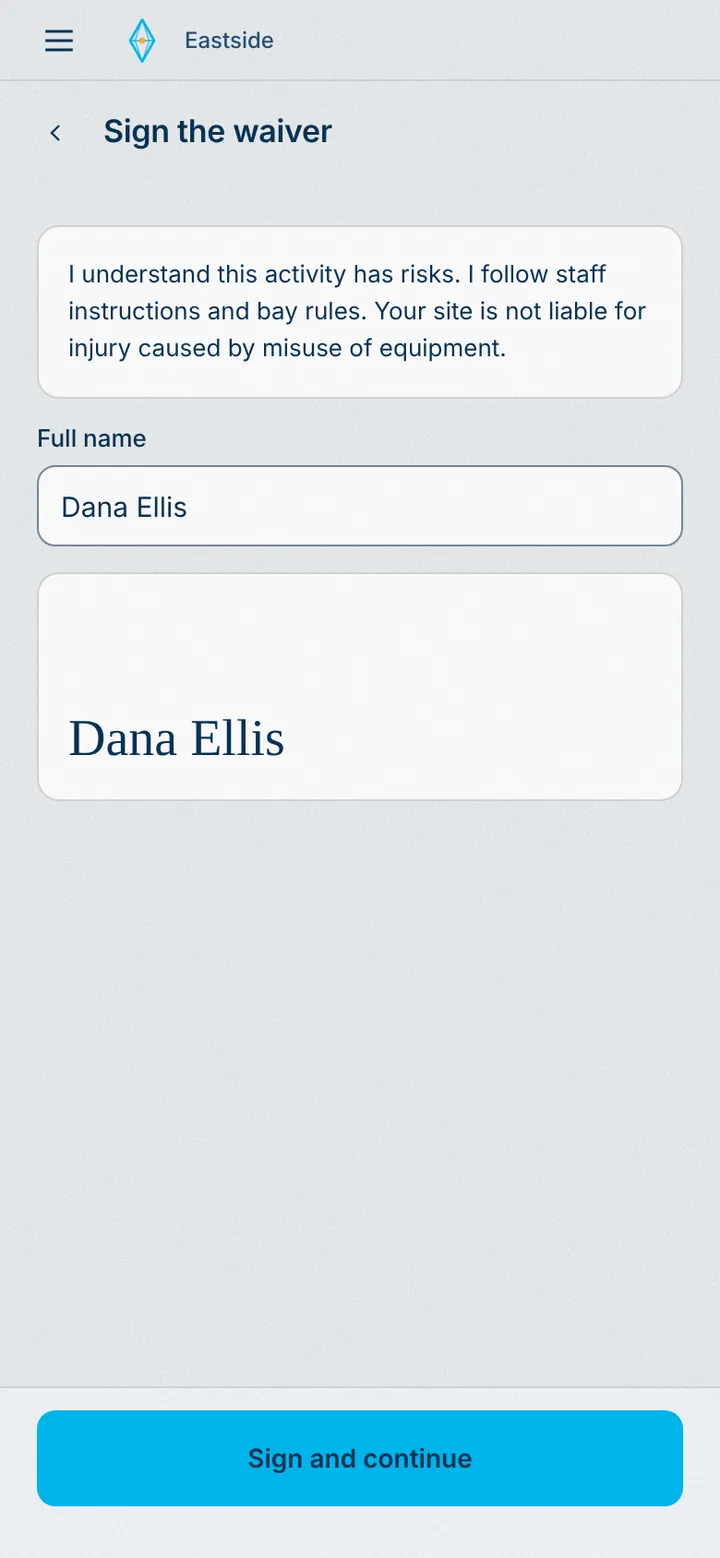
Starts in Guest app, runs through Booking engine, lands on Host iPad and Insights.
The signature attaches to the guest and the booking.
- 02 · Guest
A guardian for each minor
Minors join under an adult in the group.
Minors covered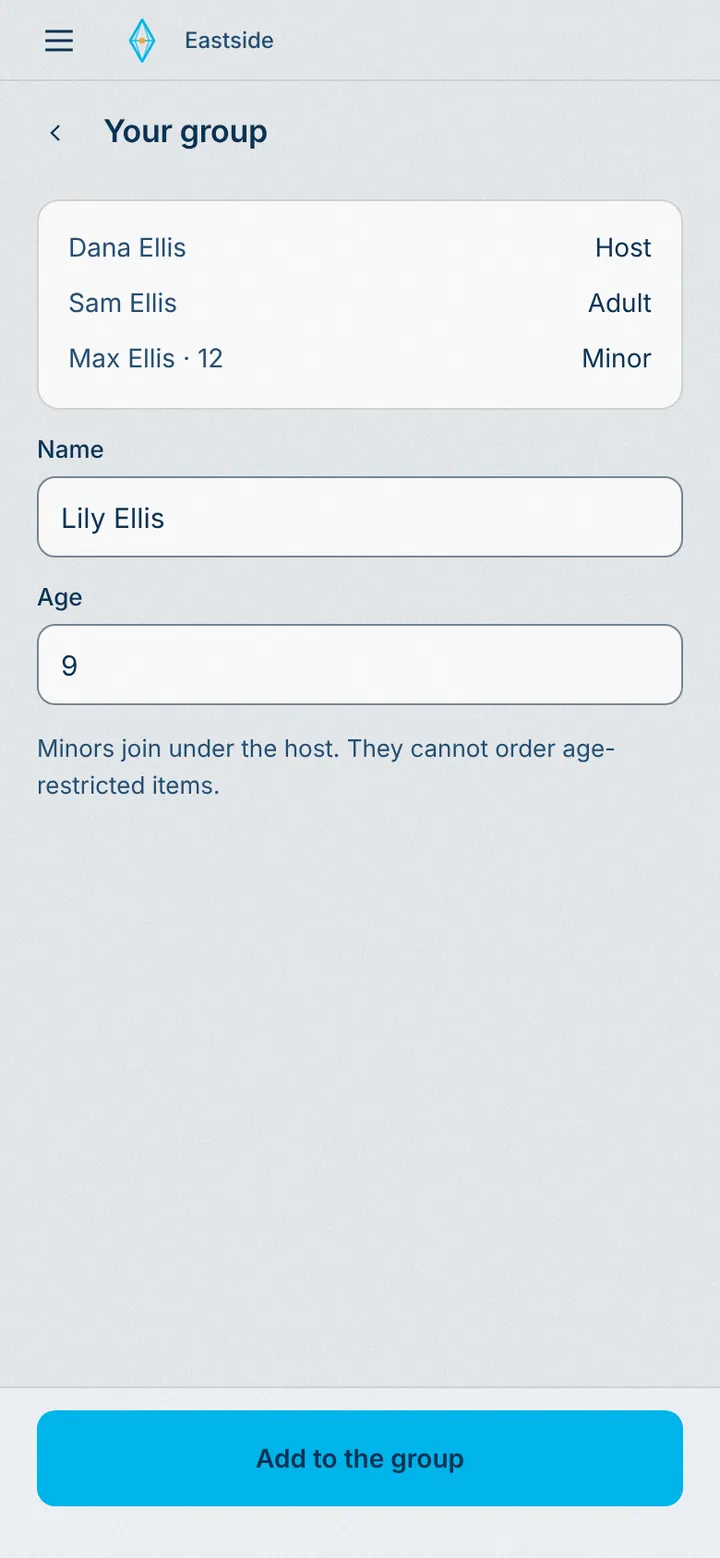
Starts in Guest app, runs through Booking engine, lands on Host iPad.
The host sees who is covered before seating.
- 01 · Guest
Join from their phone
Member prices and perks, paid in one tap. Change card or cancel by link.
Memberships and loyalty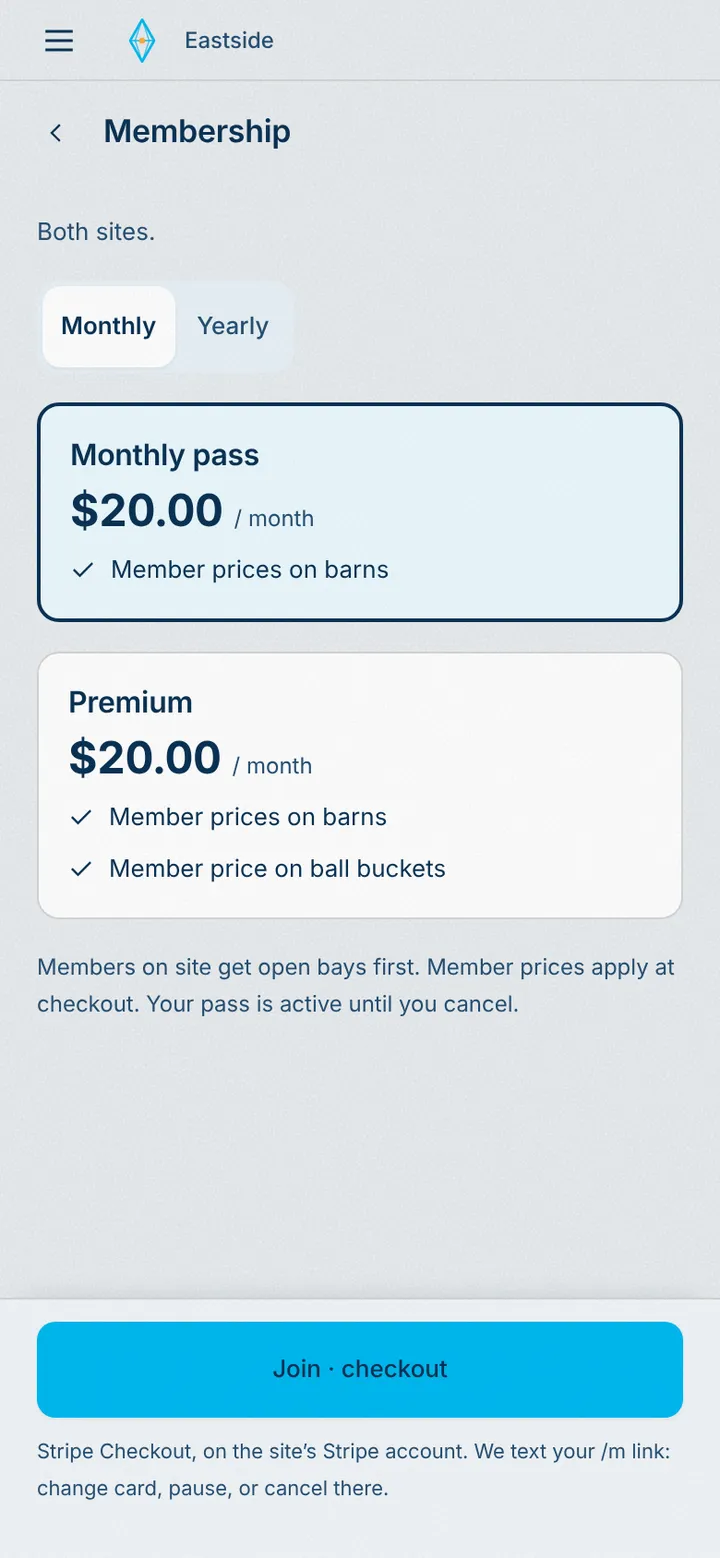
Starts in Guest app, runs through Booking engine and Payment engine, lands on POS iPad and Insights.
The plan and its perks follow the guest everywhere.
- 02 · Guest
Members manage it themselves
Change card or cancel from their own link.
Self-serve membership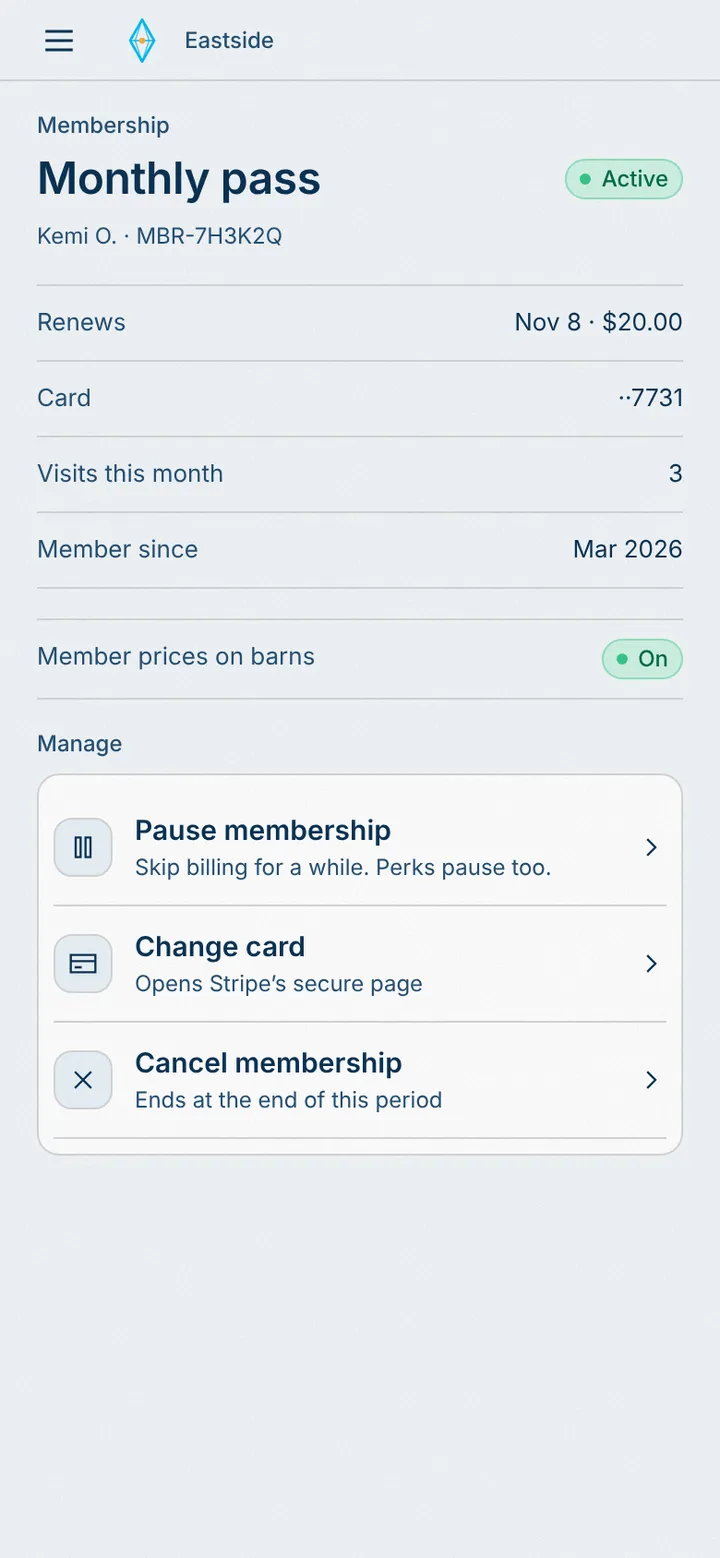
Starts in Guest app, runs through Booking engine and Payment engine, lands on Insights.
A change or cancel updates the member list in the HQ.
- 03 · HQ
Every member in one list
Plans, renewals, and visits, with past-due members flagged.
Members at a glance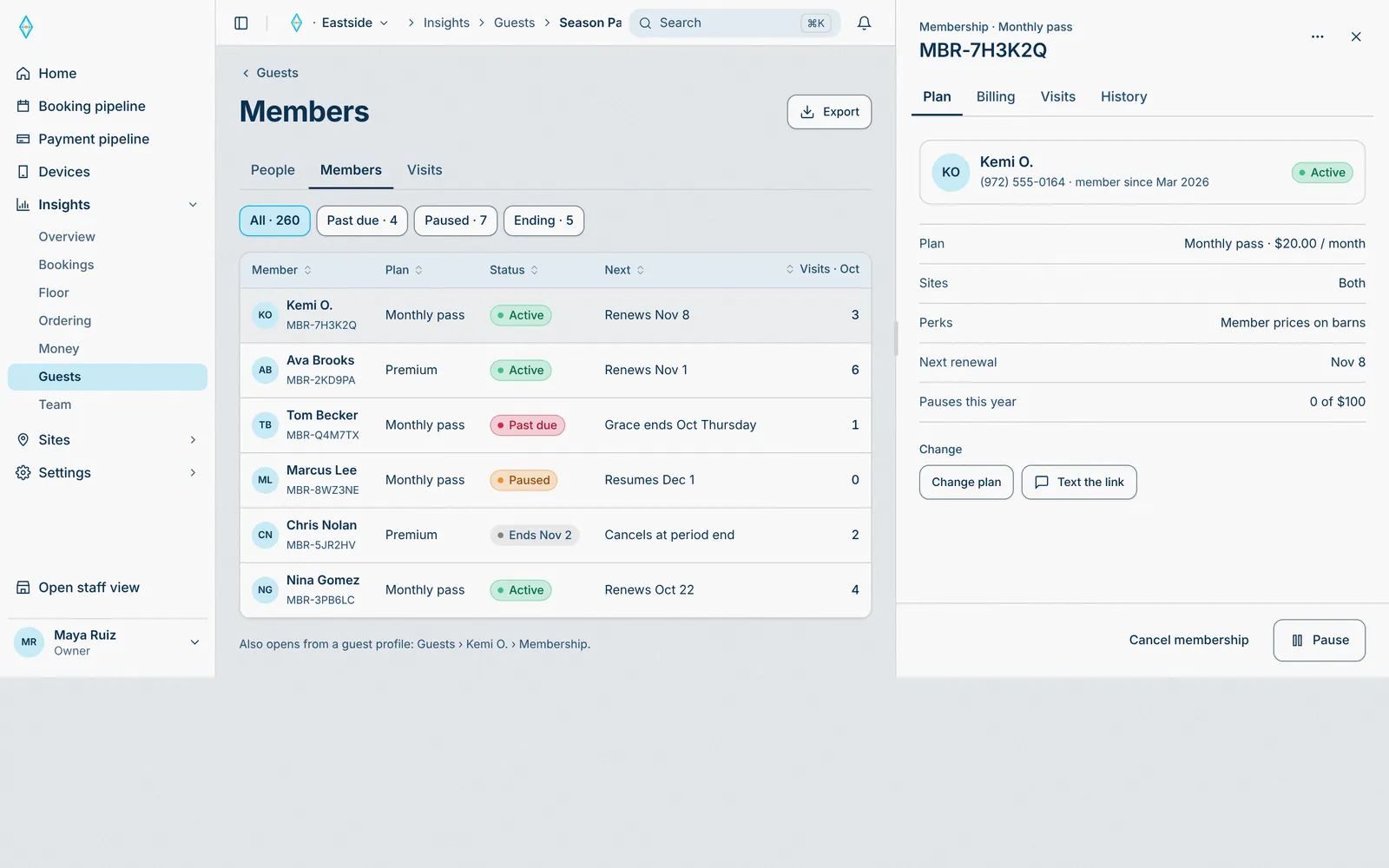
Starts in Sede HQ, runs through Booking engine and Payment engine.
Every plan change shows here at once.
- 01 · Guest
Points in their pocket
Every paid order earns points. Rewards apply at checkout.
Points and rewards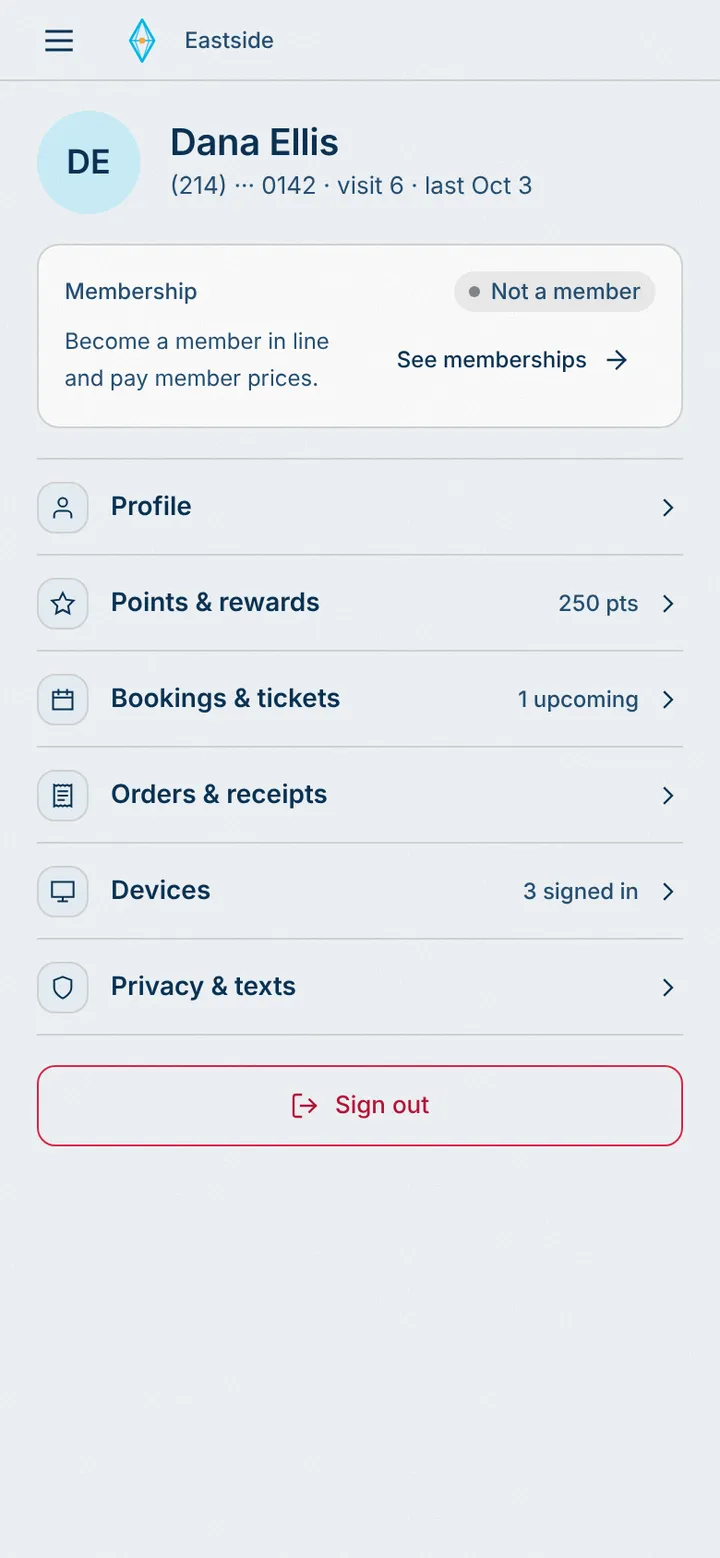
Starts in Guest app, runs through Booking engine and Payment engine, lands on Guest phone.
Points post when the order is paid.
- 02 · HQ
Set the earn rules
Guests earn when an order is paid or a visit checks in. Turn each rule on or off.
Rules, not code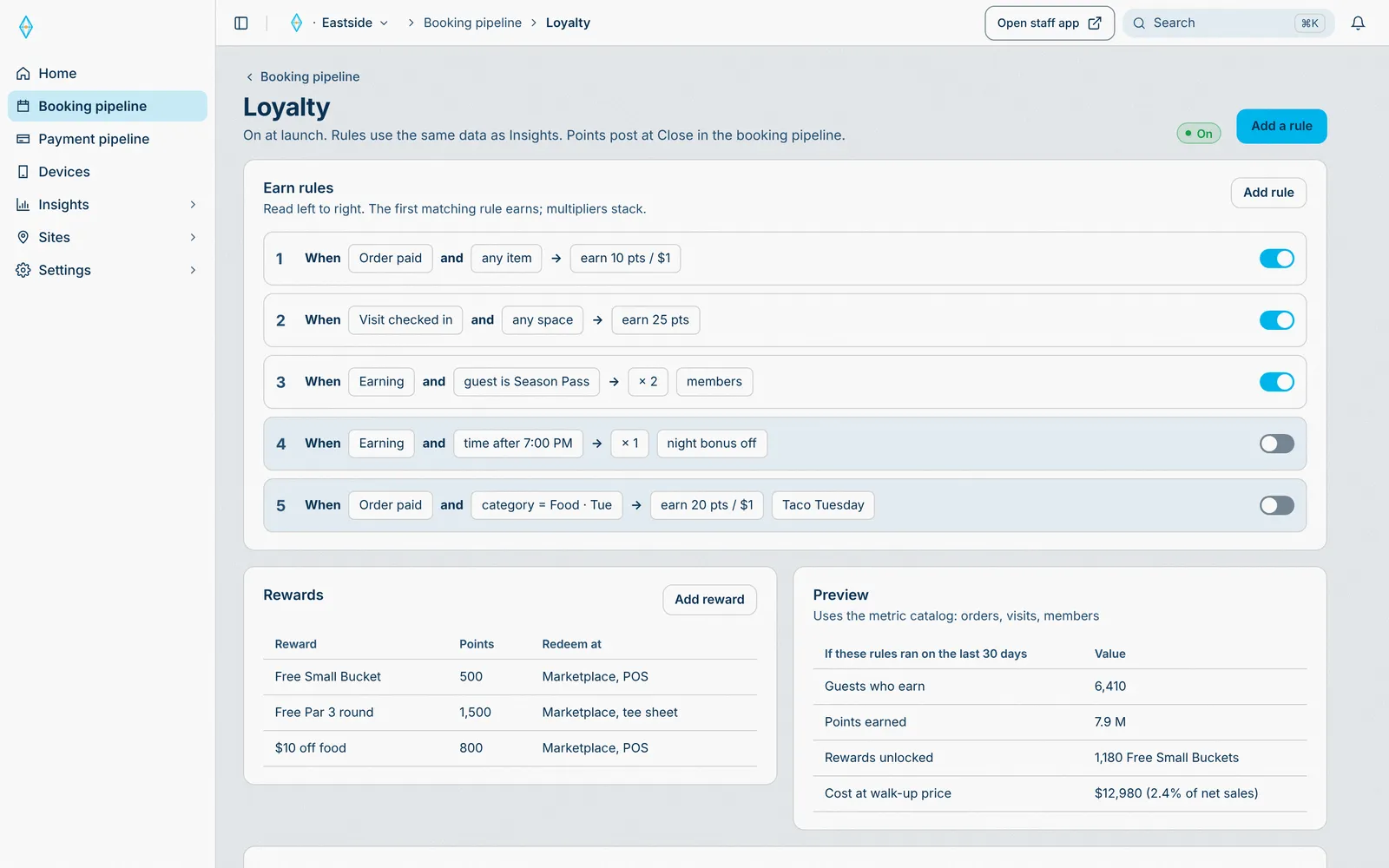
Starts in Sede HQ, runs through Booking engine and Payment engine, lands on Guest phone and POS iPad.
The rules apply at the POS and in the guest app.
- 01 · Manager
Today, live
What needs a manager now, across the site, live.
Needs you now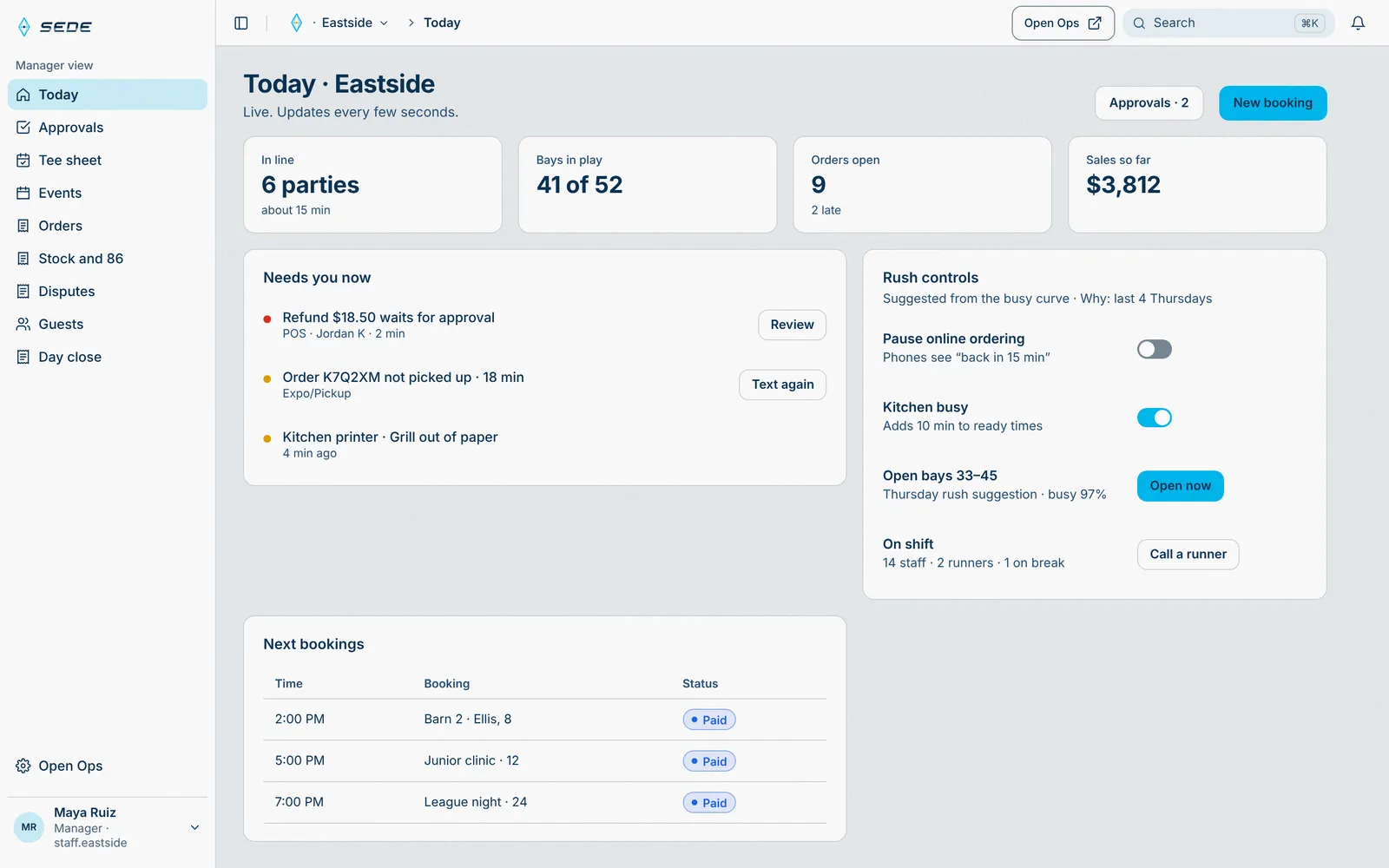
Starts in Sede HQ, lands on Guest phone and Kitchen display.
Every station reports in, every few seconds.
- 02 · HQ
Every site, one account
Hours, defaults, and what each site can change.
Site management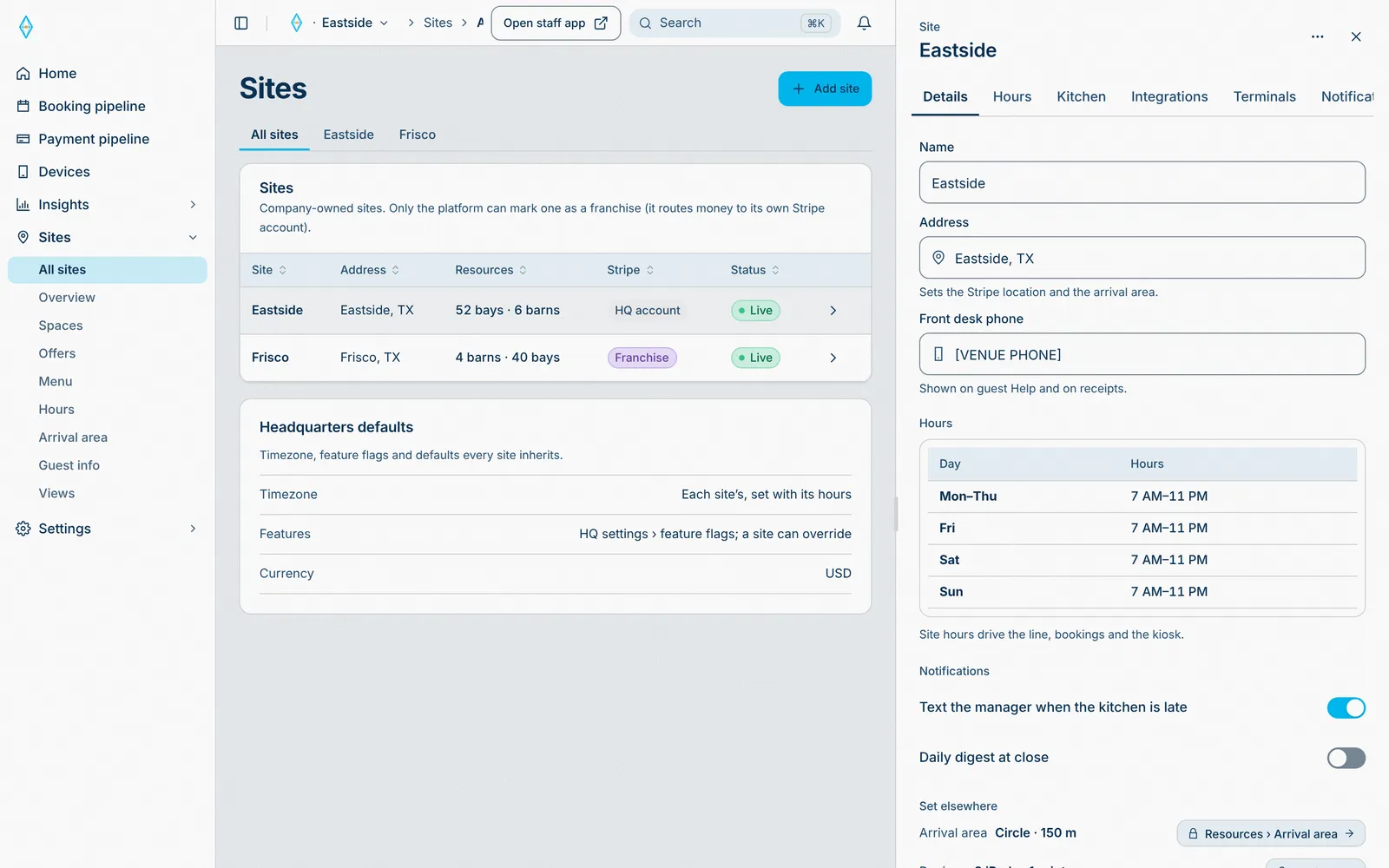
Starts in Sede HQ, lands on Staff iPads.
Site defaults apply. A site changes only what the HQ allows.
- 01 · HQ
Everyone on the team
Every person, their role, their sites, and how they sign in.
People across sites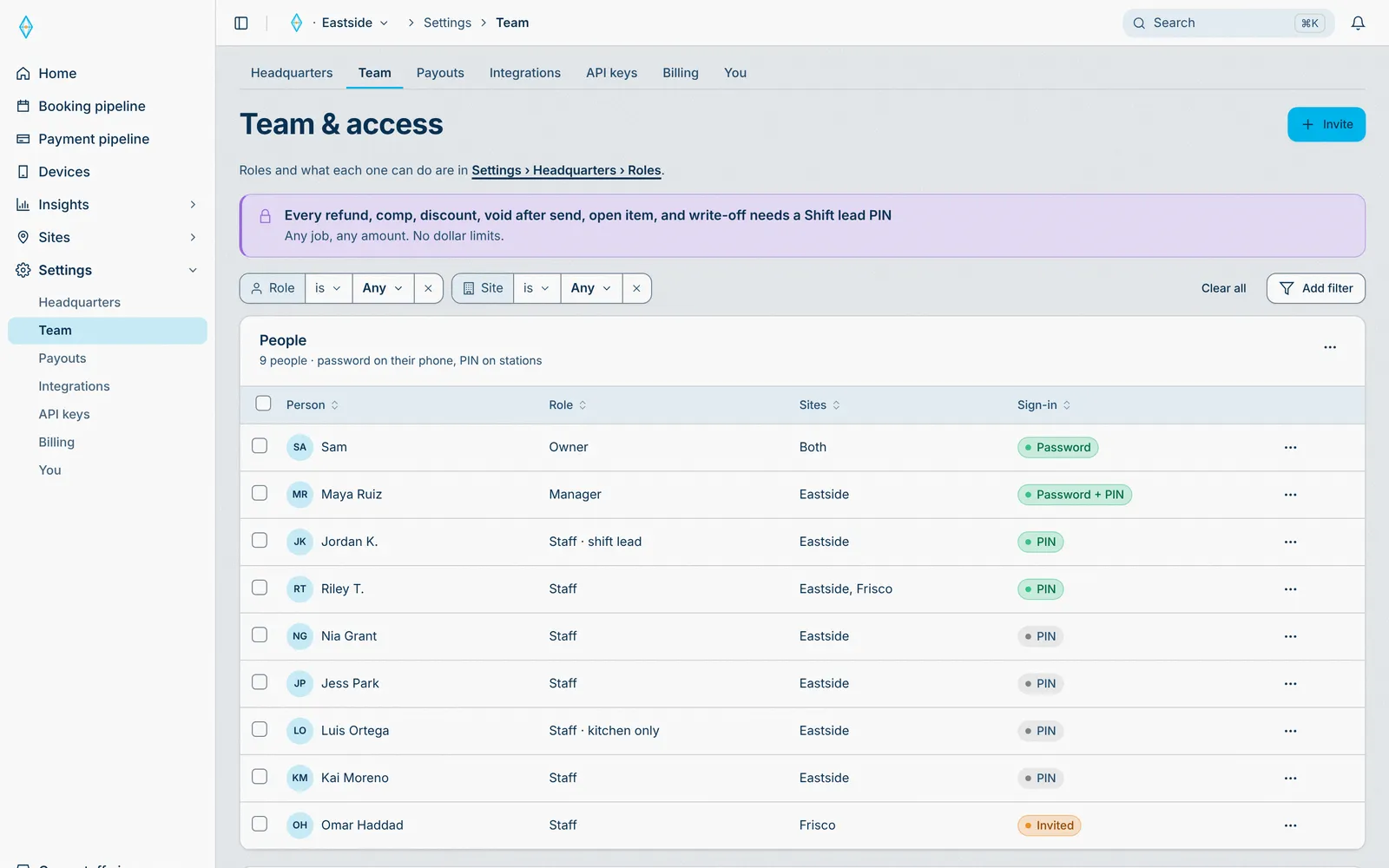
Starts in Sede HQ, lands on Staff iPads.
A new person signs in on any iPad their role allows.
- 02 · HQ
Roles decide who can do what
Which iPad jobs a role opens, and who can approve refunds or change settings.
Granular permissions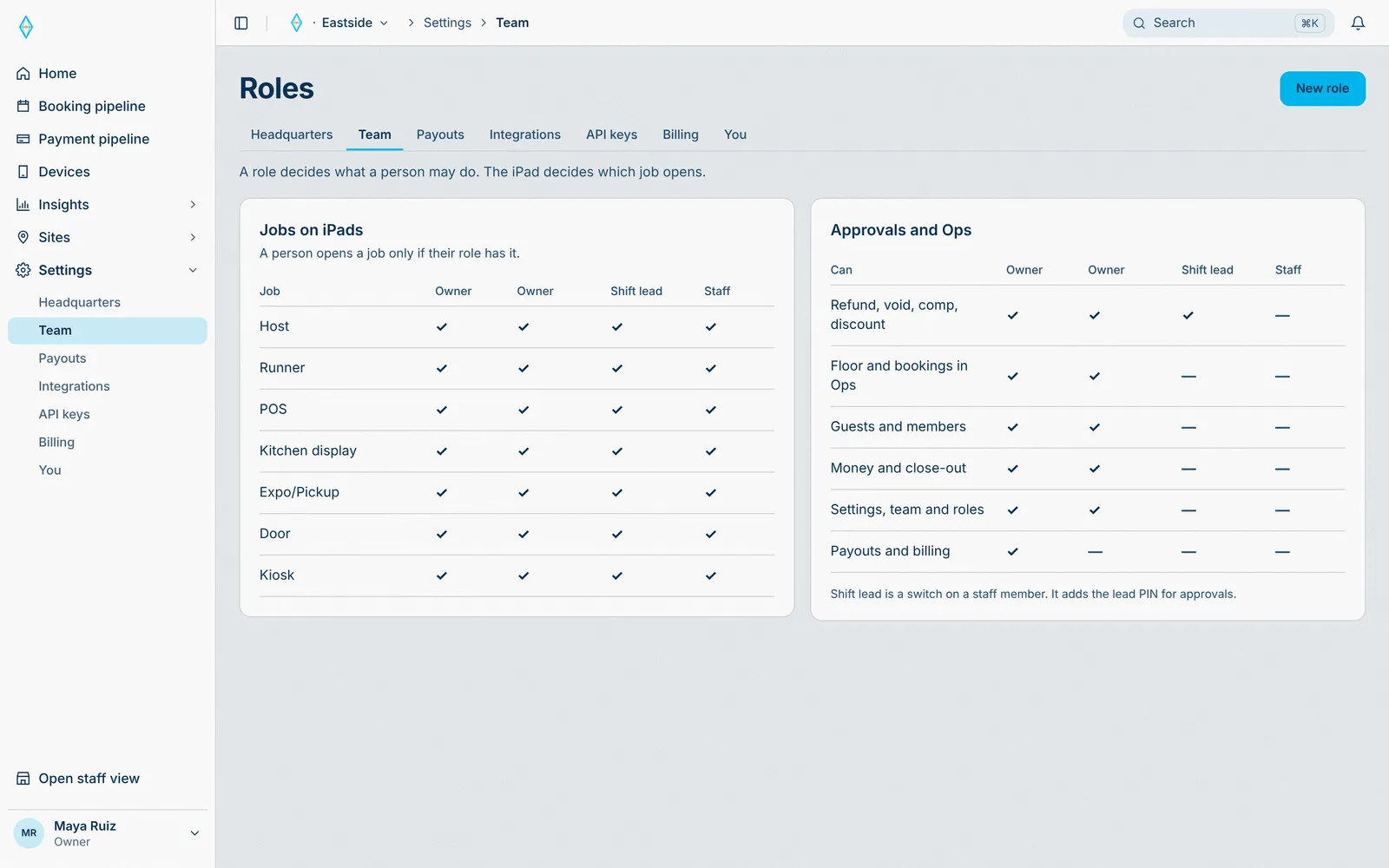
Starts in Sede HQ, lands on Staff iPads and Kitchen display.
A permission change reaches every iPad at once.
- 03 · HQ
People, sites, and devices
Set each person’s role, the sites they work, and the iPad jobs they open.
Access per person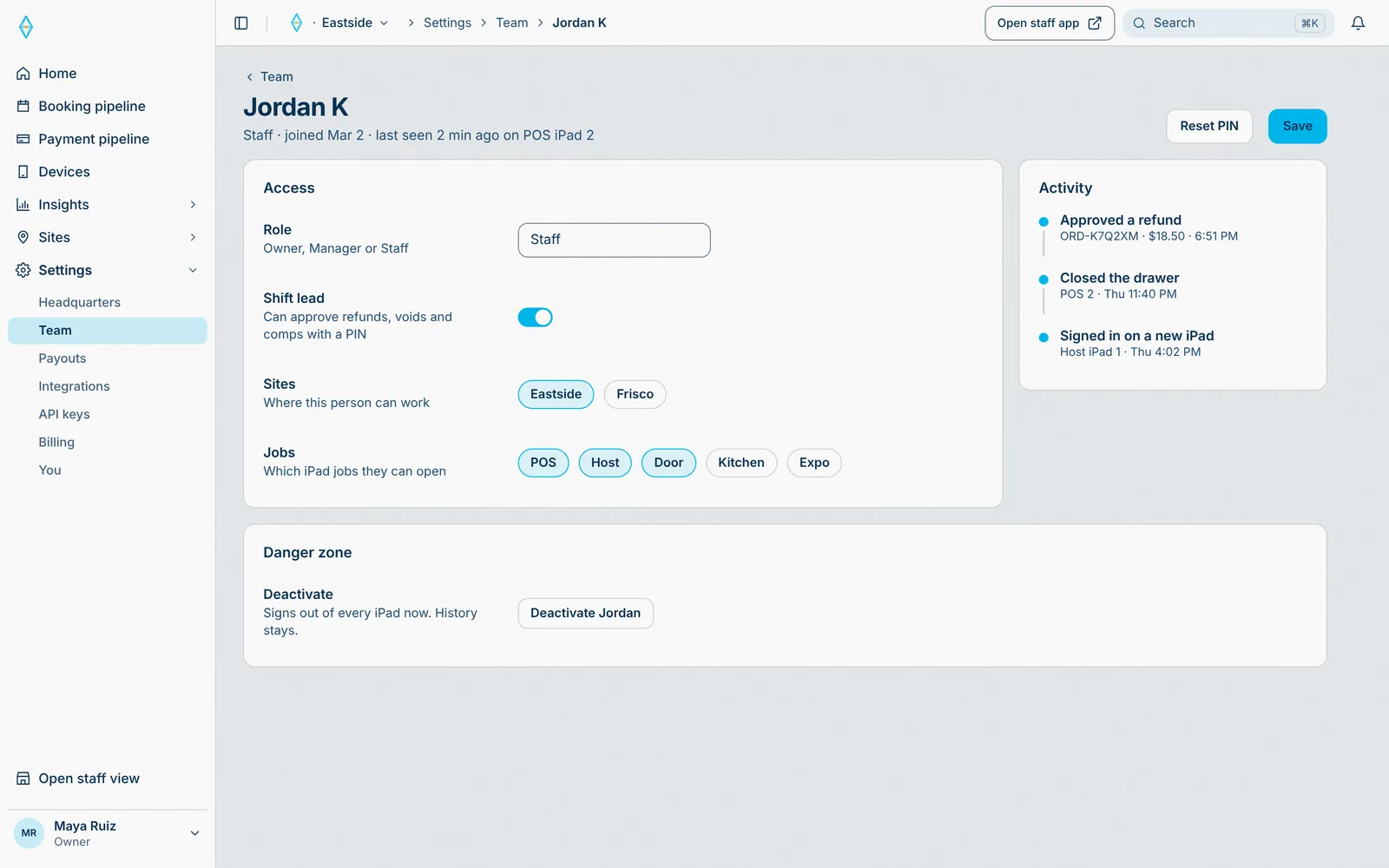
Starts in Sede HQ, lands on Staff iPads.
Their iPads open only the jobs they are allowed.
- 01 · HQ
Every device, one list
Every iPad, reader, and printer, by site and station, with its status.
Devices at a glance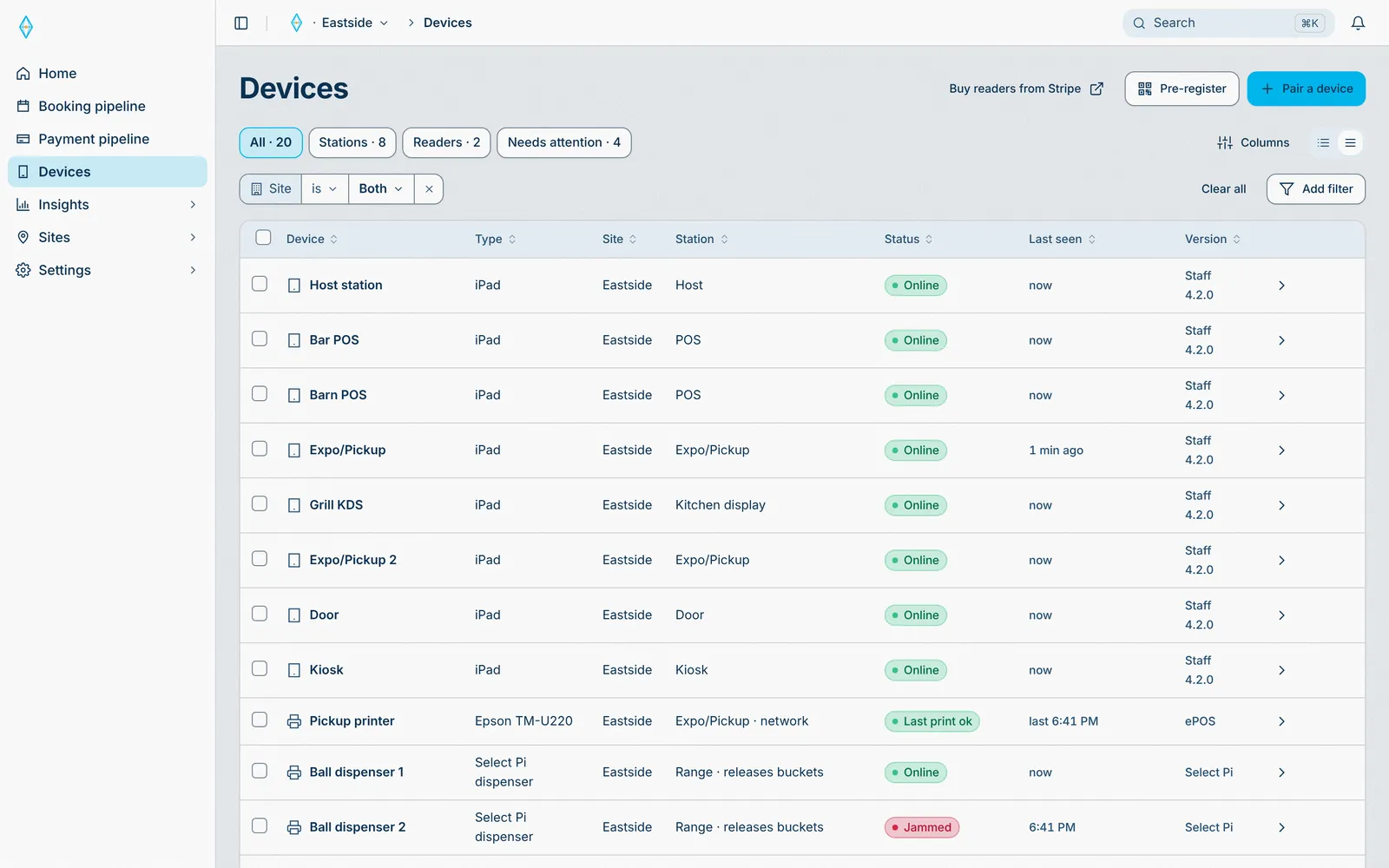
Starts in Sede HQ, lands on Staff iPads and Kitchen display.
Each device reports in, live.
- 02 · HQ
Pair a device in a minute
Pair iPads with a code or a QR, and card readers in a minute.
Hardware that pairs itself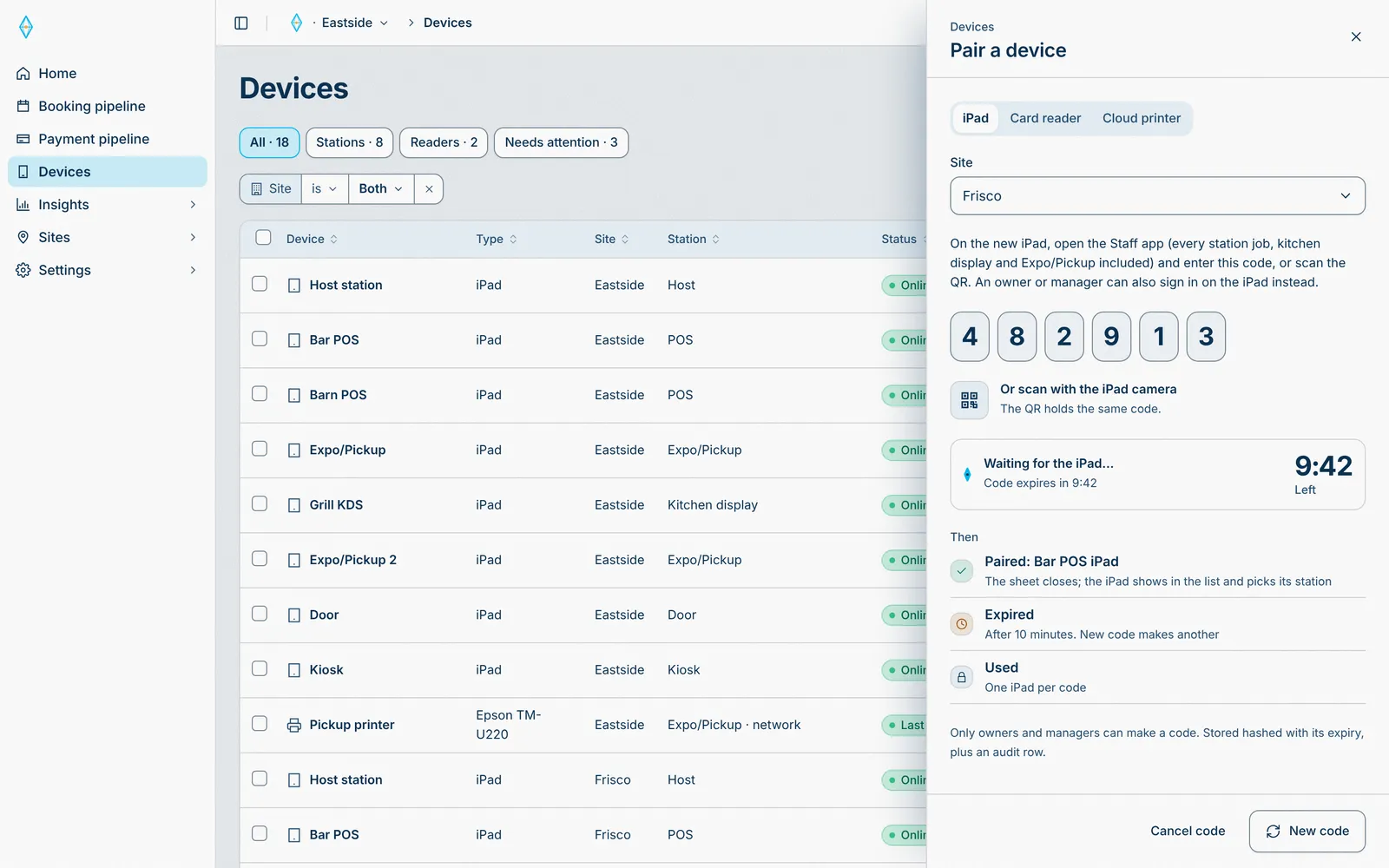
Starts in Sede HQ, lands on Staff iPads.
The new device shows in the list and opens its station job.
- 01 · HQ
A franchise site, your rules
The franchise runs the site on its own Stripe account. HQ locks the brand, loyalty, and refund rules.
Franchise management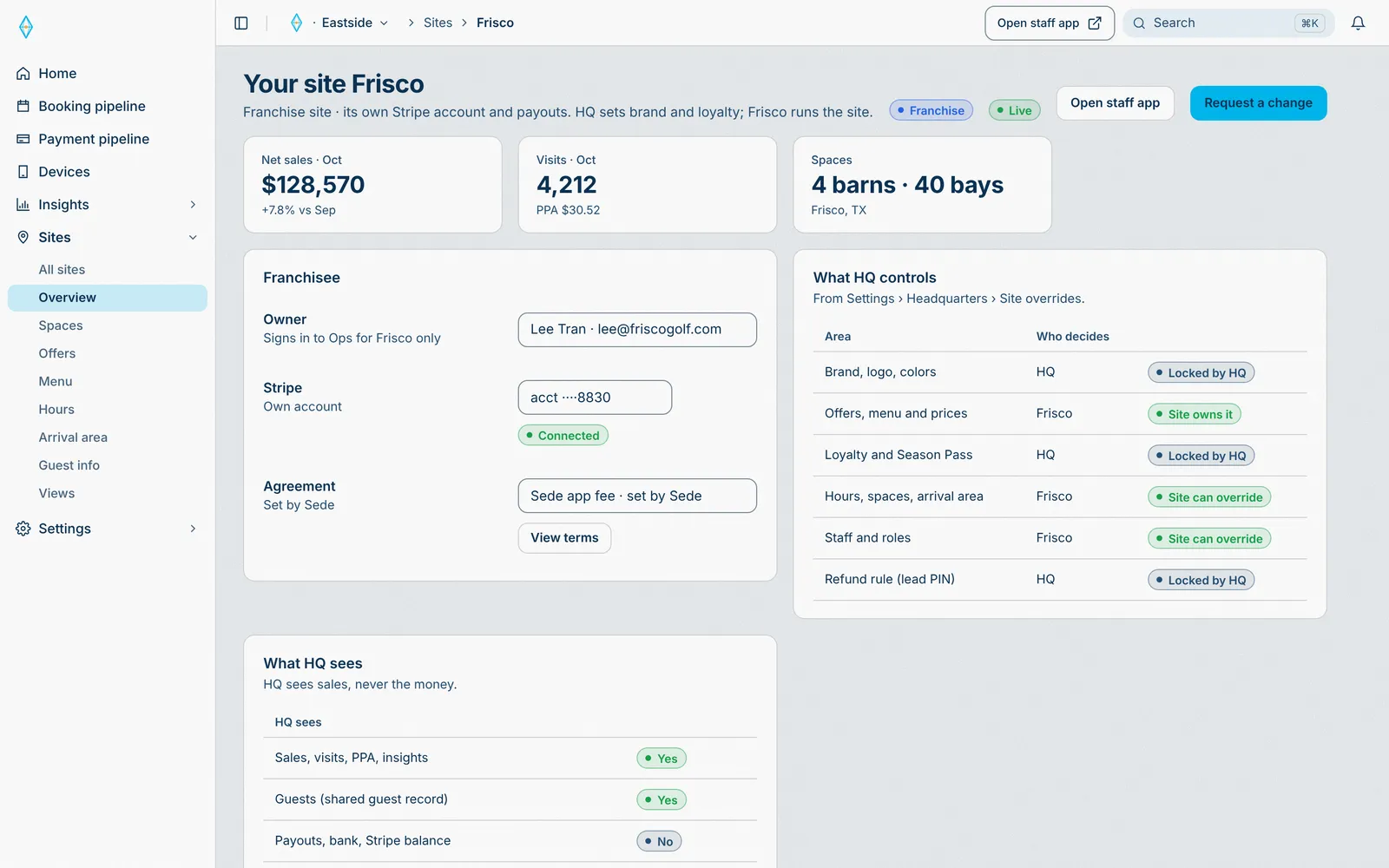
Starts in Sede HQ, lands on Staff iPads and Guest phone.
Locked rules apply at the franchise; the rest it sets itself.
- 02 · HQ
Their own money, your view
A franchise connects its own Stripe account. The HQ sees its sales, never its money.
Separate payoutsStarts in Sede HQ, lands on Staff iPads.
Sales report to the HQ; payouts go to the franchise.
- 01 · HQ
The owner’s home
Gross sales, orders, utilization, and the next payout, at a glance.
At a glance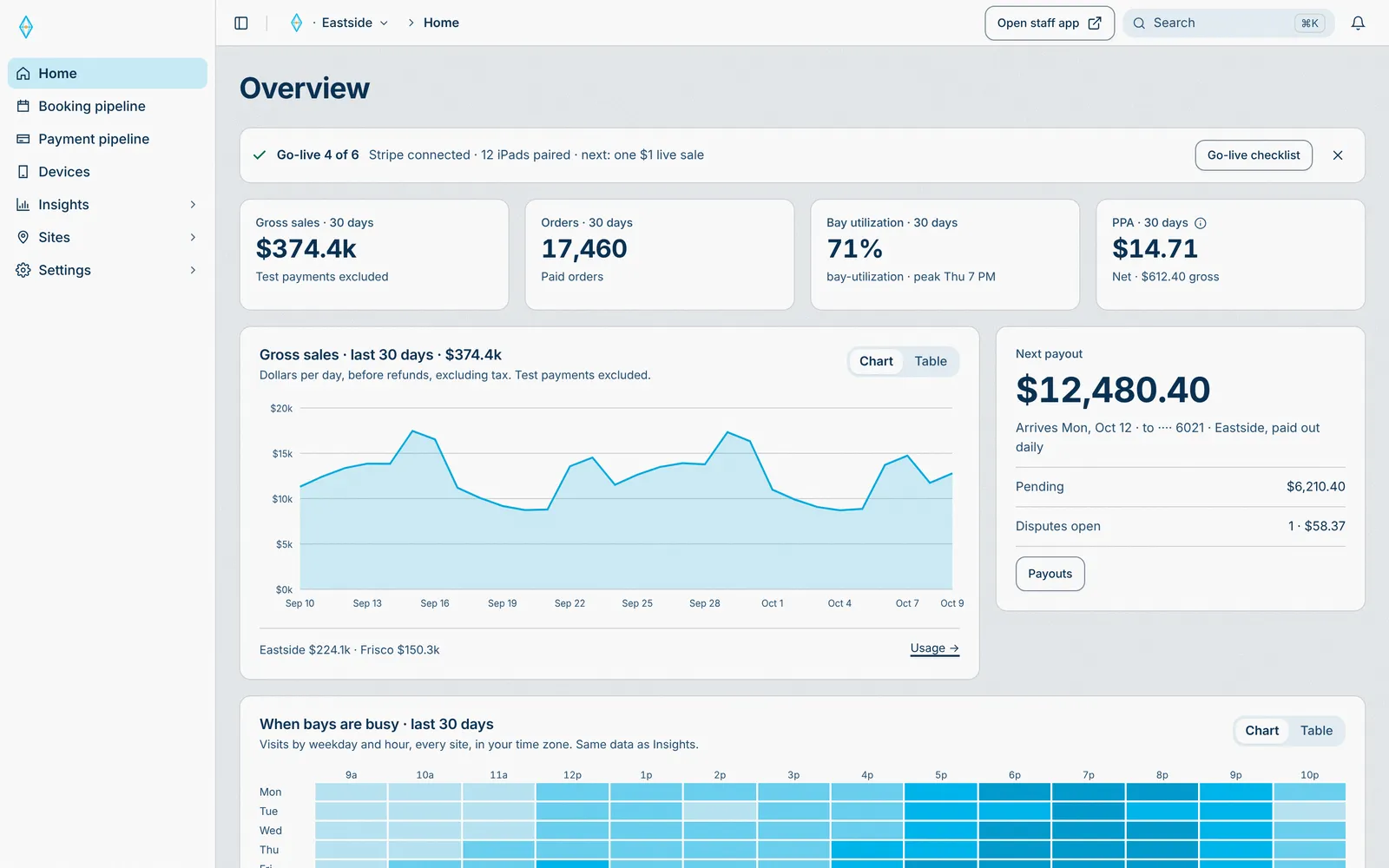
Starts in Every sale and visit, runs through Booking engine and Payment engine, lands on Insights.
Every sale and visit rolls up here.
- 02 · Insights
Floor and visits
What each space earns, turns per bay, and party size.
Know every space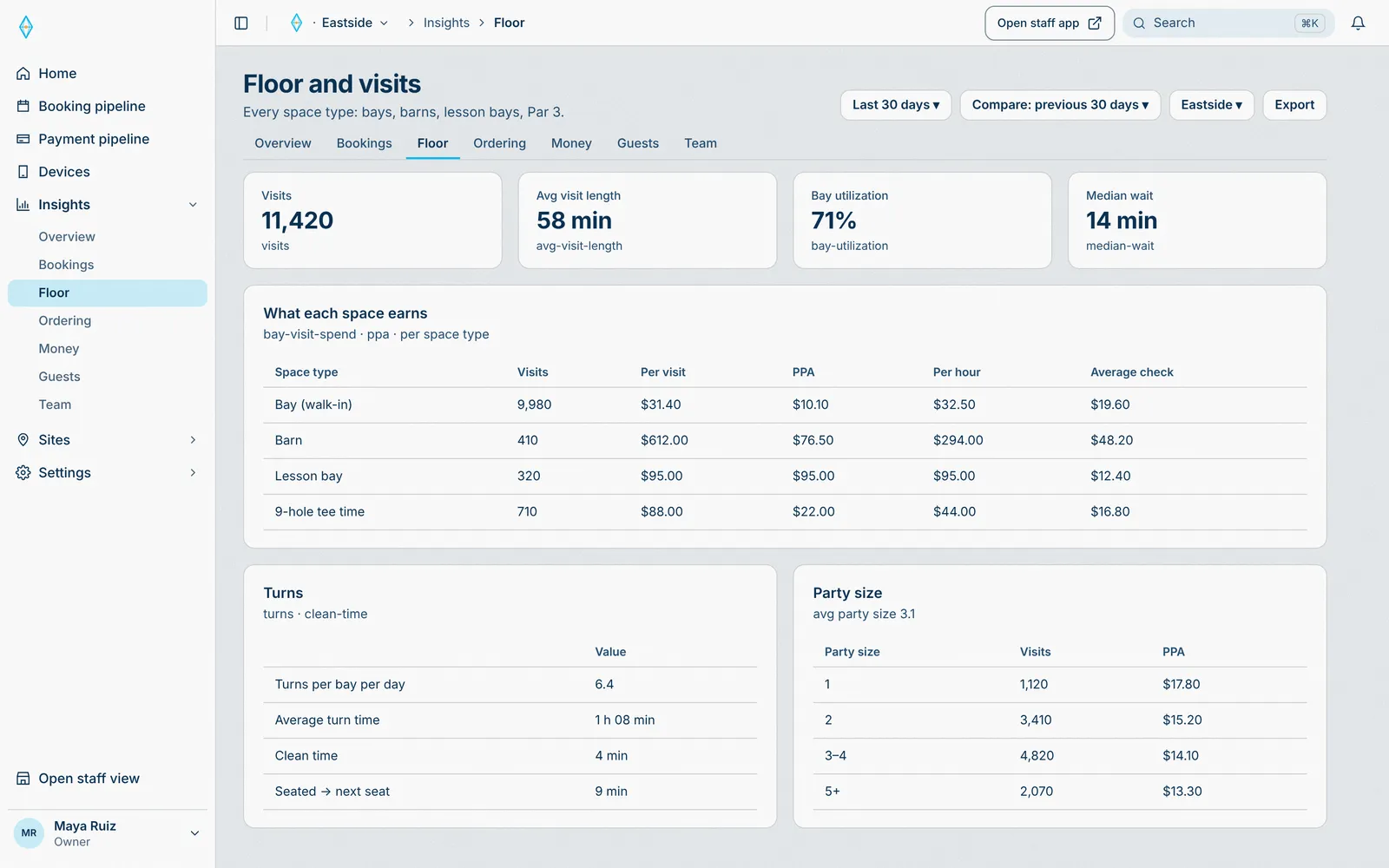
Starts in Every sale and visit, runs through Booking engine and Payment engine, lands on Insights.
Every visit lands in insights.
- 03 · Insights
Ordering and kitchen
Ticket times and the phone ordering funnel, from menu to paid.
Know every order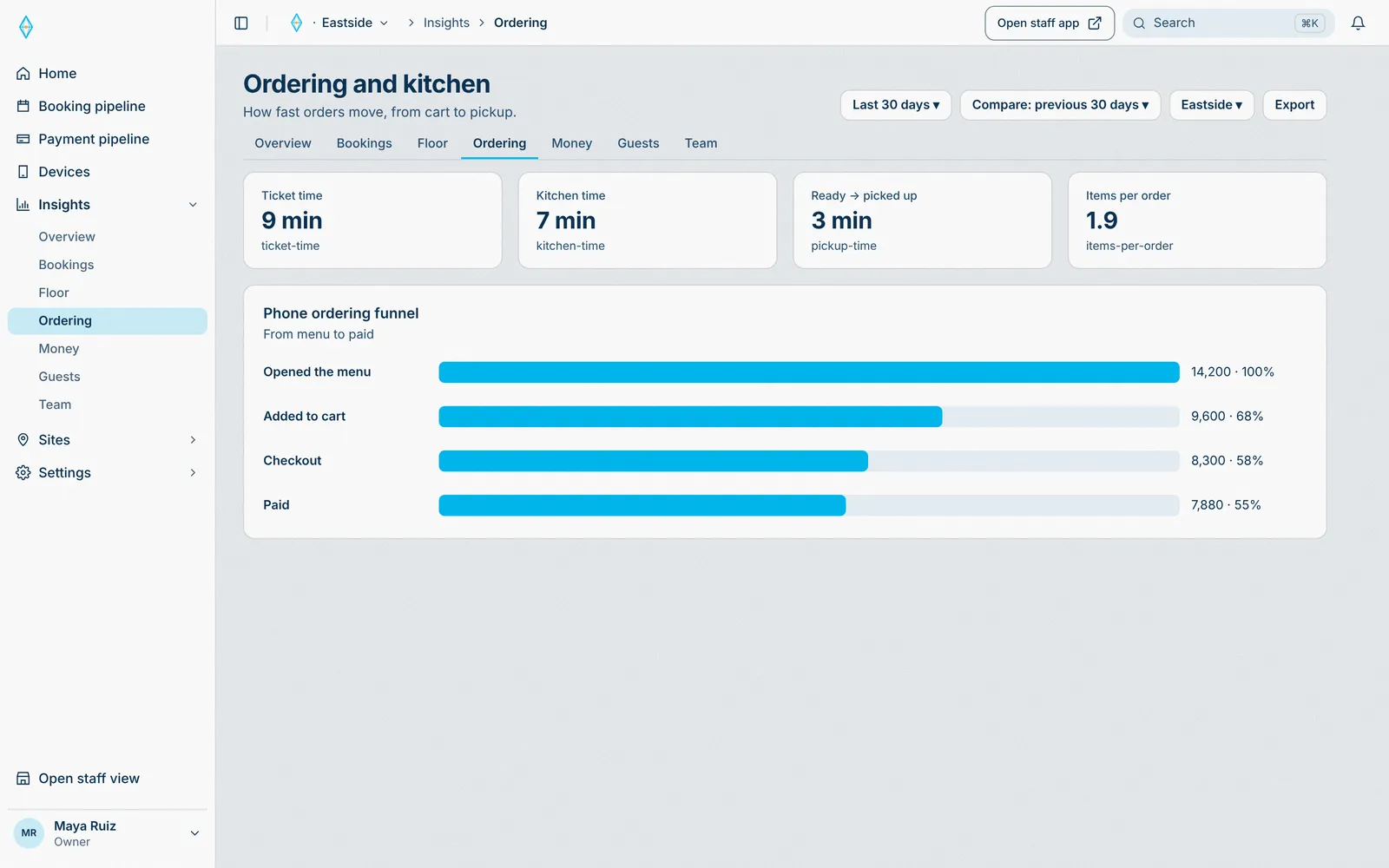
Starts in Every sale and visit, runs through Booking engine and Payment engine, lands on Insights.
Every order and ticket time lands in insights.
- 04 · Insights
Staff
Sales, orders, average check, and tips, per person.
Know your team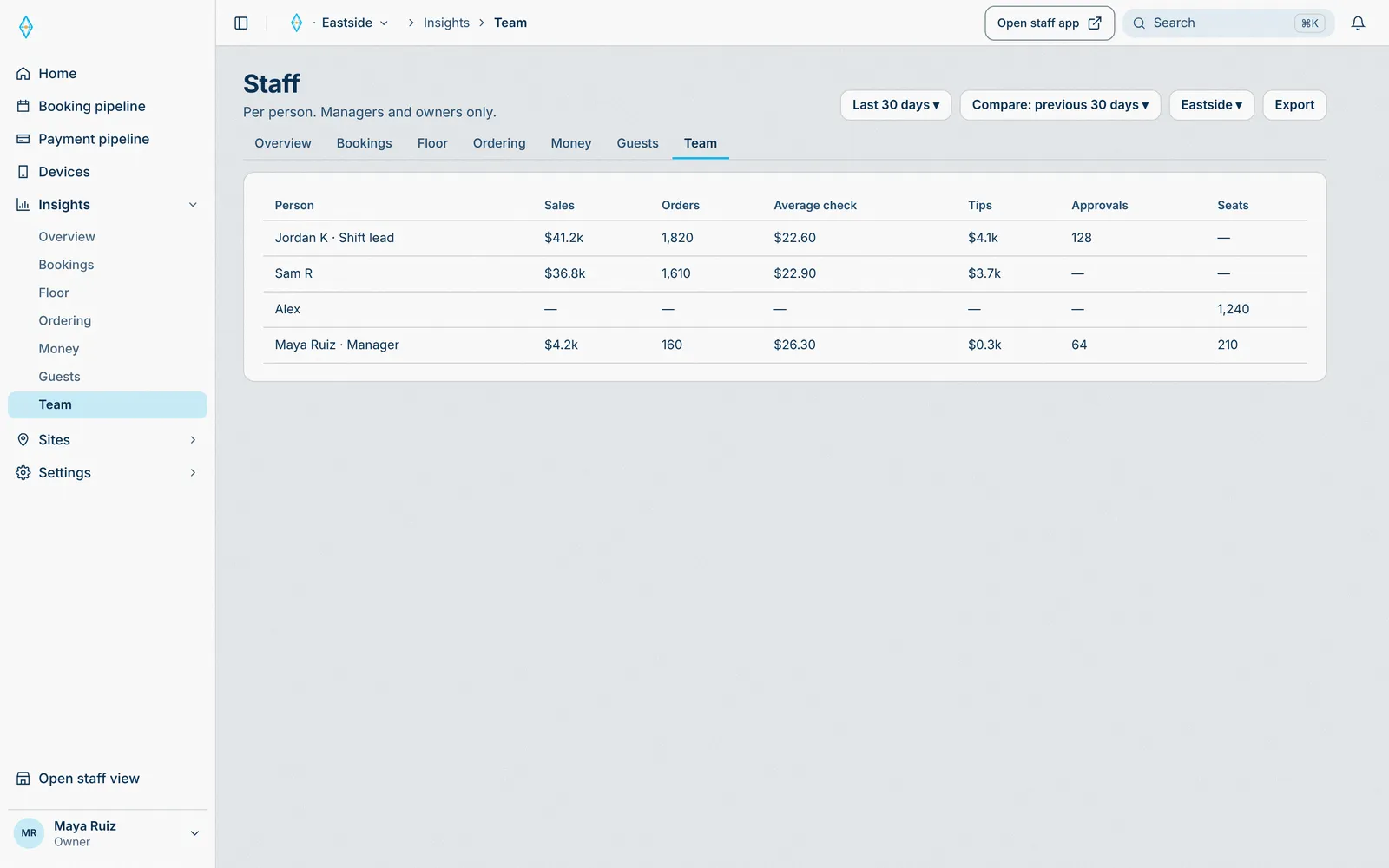
Starts in Every sale and visit, runs through Booking engine and Payment engine, lands on Insights.
Every sale is tied to the person who made it.
- 05 · HQ
Insights across sites
Every site, in one HQ.
One HQ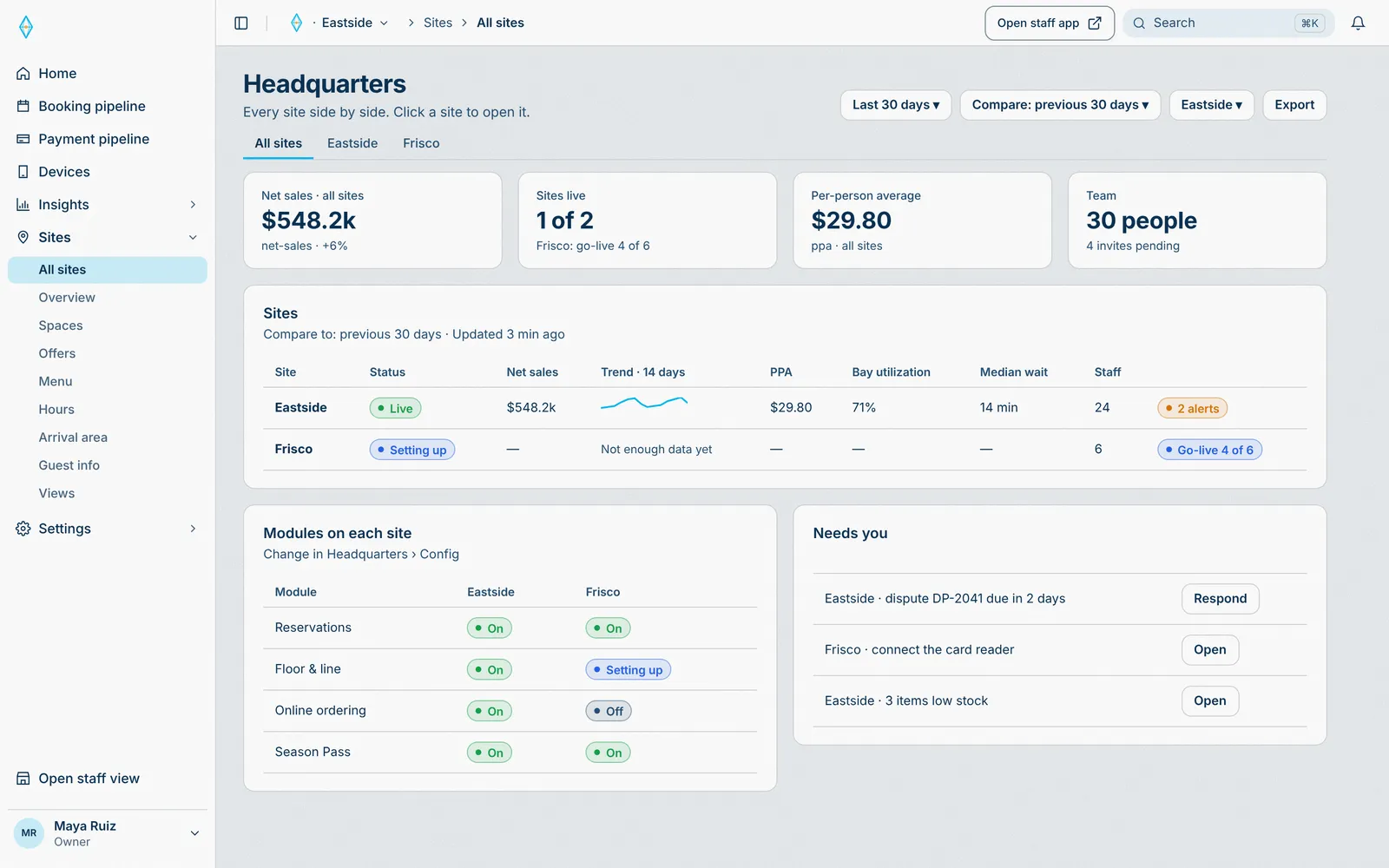
Starts in Every sale and visit, runs through Booking engine and Payment engine, lands on Insights.
Every site’s numbers, in one HQ.
- 01 · HQ
Your brand, white-labelled
Your logo, app icon, and colours. Publish once, every guest screen updates.
White-label branding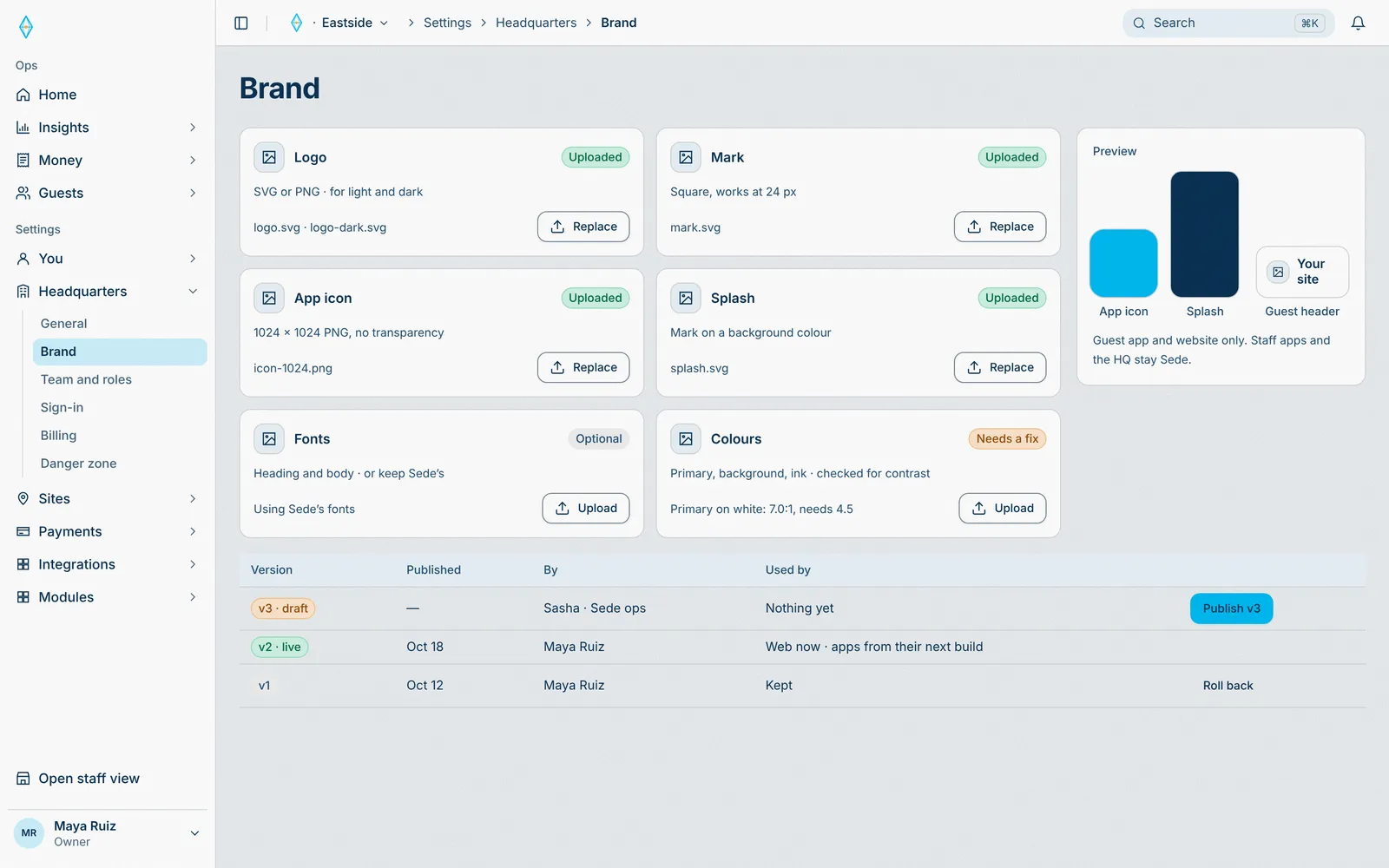
Starts in Sede HQ, lands on Guest phone.
The logo and colours publish to every guest screen.
- 02 · Guest
Your name on the guest app
Guests order and book in your brand, from a QR or a text link. No app to download.
Your brand, not oursStarts in Sede HQ, lands on Guest phone.
Every guest screen shows your logo and colours.
- 03 · Guest
Every confirmation, in your brand
Bookings, tickets, and texts carry your name.
One brand end to endStarts in Sede HQ, lands on Guest phone.
Texts and confirmations go out in your name.
- 01 · HQ
Card readers, paired to a POS
Enter the serial, pick the POS iPad, verify with one dollar. The reader takes cards at that station, offline too.
Stripe card readers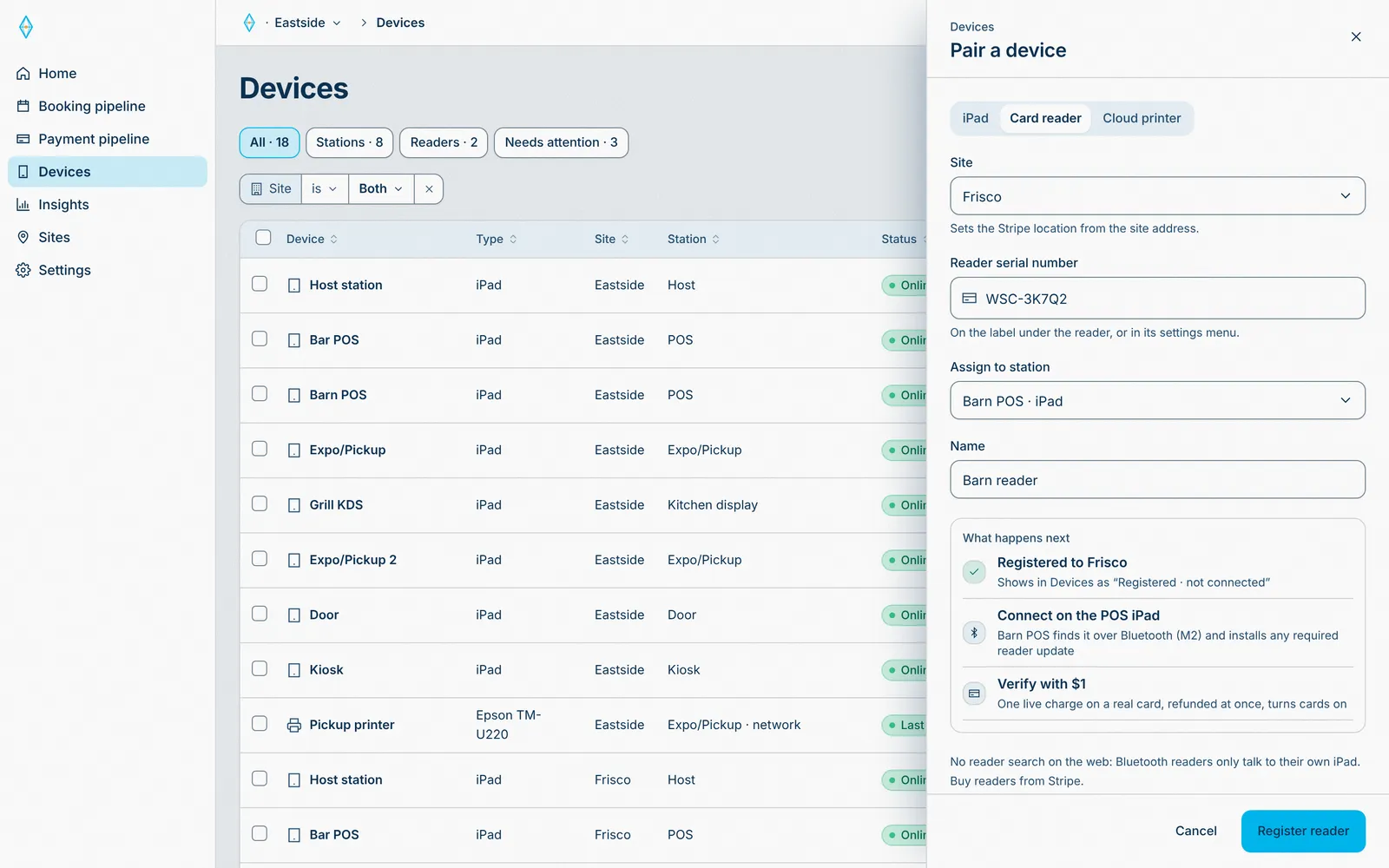
Starts in Sede HQ, runs through Payment engine, lands on Card reader and POS iPad.
Card sales at that station go through the payment engine.
- 02 · HQ
Ball dispensers, as devices
Each Select Pi dispenser pairs like any device and shows its status. A bucket sale releases the balls.
A sale releases the ballsStarts in Sede HQ, runs through Payment engine, lands on Ball dispenser.
Devices shows each device’s status.
- 03 · HQ
Printers and cash drawers
Epson receipt and kitchen printers, on the site network or Bluetooth. The cash drawer opens on a cash sale.
Tickets print by stationStarts in Sede HQ, runs through Payment engine, lands on Kitchen printer and Cash drawer.
Each printer reports its last print in Devices.
- 01 · HQ
Your data, in your warehouse
Sales, visits, and bookings sync to your Snowflake account.
Data sync to Snowflake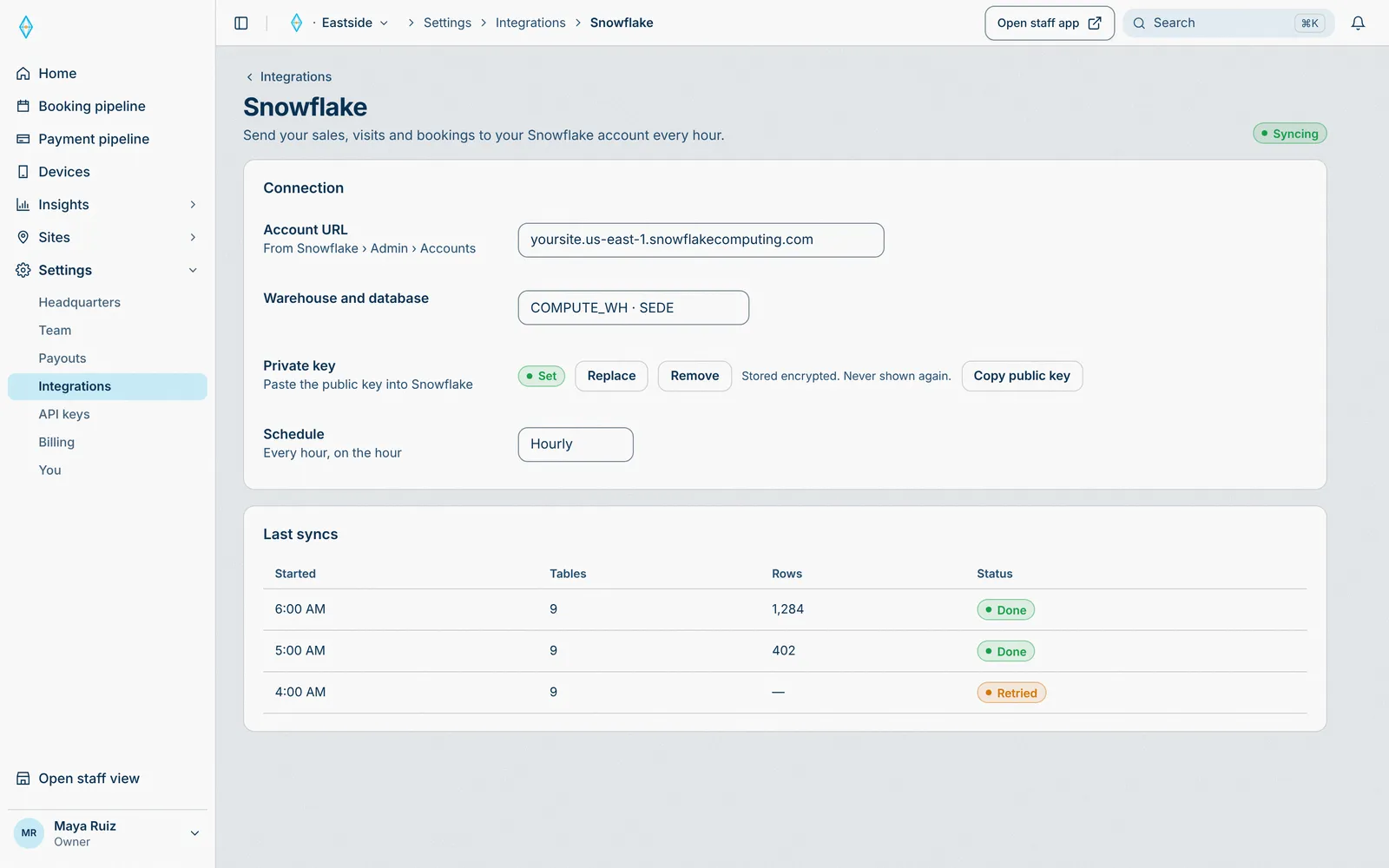
Starts in Sede HQ, runs through Payment engine, lands on Snowflake.
Every sync shows its tables, rows, and status.
- 01 · HQ
Sign in with your company account
Single sign-on for owners and managers (Google Workspace, Microsoft Entra ID) is coming soon. Staff on iPads keep their PIN.
Single sign-on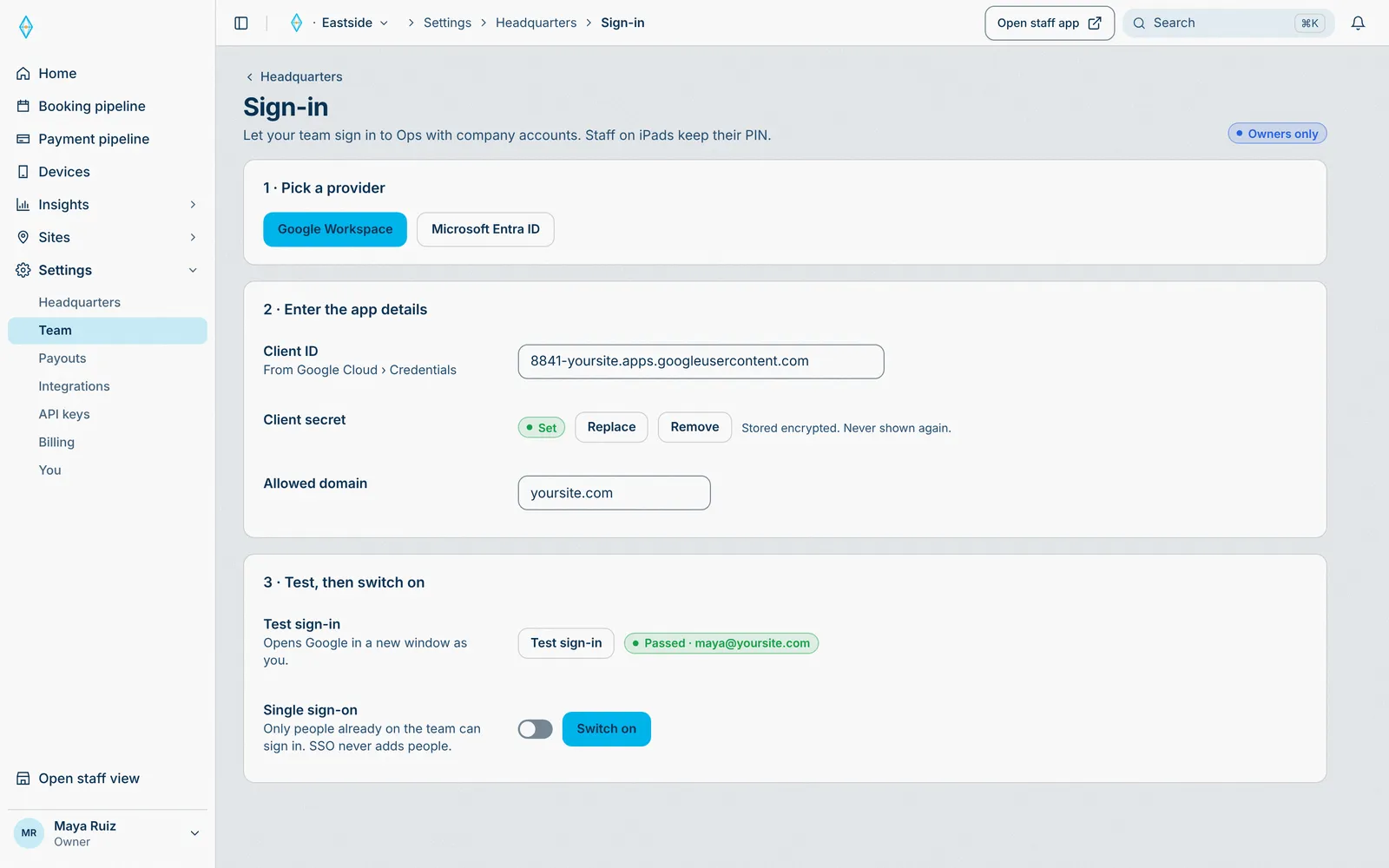
Starts in Sede HQ, lands on Team sign-in.
Only people already on the team can sign in.
Real Sede screens. Example data.
Forward-deployed commerce
The point of sale isn’t the point.
The sale is. Capture it at the door, in the line, at the bay, at the table, or on the guest’s phone. No app, no wait.
Unlock more sales
The door, the line, the bay, and the guest’s phone all become places to buy.
Power in the guest’s hands
Guests join, order, and pay from their own phone. No app, no password.
Simple to run
One staff app on iPads, one HQ for every site, and it keeps selling offline.
Modules
Turn it on. Watch it flow.
Pick a moment at your site. See where it starts, what the core does, and everything it reaches.
Three interfaces put events in. Two engines do the work. Every module plugs into the core, and each event lands on the devices, hardware, and business systems that read it.
Pick a module to see what it touches.
In
Guest app Guests order, book, and pay
Staff app Staff run the floor on iPads
Sede HQ Owners set up every site
Sede core
Booking engine Pick · Line · Hold · Pay · Confirmed · Check in · After
Payment engine Cart · Price · Pay · Payout · After
Modules: POS, Online ordering, Kitchen display, Floor & line, Bookings, Events, Waivers, Memberships, Loyalty, Hardware, Data
Out
Devices Guest phone, Staff iPads
Hardware Card reader, Kitchen printer, Ball dispenser
BizOps Stripe payout, Snowflake, Insights
Staff ring up food and drinks on the POS iPad. Each station gets its ticket, and the guest gets a receipt.
Sede builds one cart, takes payment on your Stripe, and sends the receipt.
POS is off at this site, so nothing runs. Turn it on to see the flow.
Live · synced to 7 places
Starts in
- Guest app
- Staff appStaff ring up food and drinks
- Sede HQ
The core
- Pick
- Line
- Hold
- Pay
- Confirmed
- Check in
- After
- Cart
- Price
- Pay
- Payout
- After
Sede builds one cart, takes payment on your Stripe, and sends the receipt.
Lands on
Devices
- Guest phoneReceipt by text
- Staff iPads2 iPads: Kitchen, Expo
Hardware
- Card reader
- Kitchen printerTicket printed
- Ball dispenser
BizOps
- Stripe payout+$121.24 to payout
- SnowflakeOrder in the next sync
- InsightsPOS +$121.24
POS is off at this site, so nothing runs. Turn it on to see the flow.
A guest orders from the table and pays once. The kitchen gets the ticket, and Expo knows what is coming.
Sede builds one cart and takes payment on your Stripe.
Online ordering is off at this site, so nothing runs. Turn it on to see the flow.
Live · synced to 7 places
Starts in
- Guest appA guest orders from the table
- Staff app
- Sede HQ
The core
- Pick
- Line
- Hold
- Pay
- Confirmed
- Check in
- After
- Cart
- Price
- Pay
- Payout
- After
Sede builds one cart and takes payment on your Stripe.
Lands on
Devices
- Guest phoneReceipt by text
- Staff iPads2 iPads: Kitchen, Expo
Hardware
- Card reader
- Kitchen printerTicket printed
- Ball dispenser
BizOps
- Stripe payout+$39.00 to payout
- SnowflakeOrder in the next sync
- InsightsOnline ordering +$39.00
Online ordering is off at this site, so nothing runs. Turn it on to see the flow.
The kitchen marks a ticket ready. Expo hands it off, and the guest gets a ready text.
Sede marks the order ready and tells Expo and the guest.
Kitchen display is off at this site, so nothing runs. Turn it on to see the flow.
Live · synced to 3 places
Starts in
- Guest app
- Staff appThe kitchen bumps a ticket
- Sede HQ
The core
- Pick
- Line
- Hold
- Pay
- Confirmed
- Check in
- After
- Cart
- Price
- Pay
- Payout
- After
Sede marks the order ready and tells Expo and the guest.
Lands on
Devices
- Guest phoneYour order is ready
- Staff iPadsExpo iPad: Ready to hand off
Hardware
- Card reader
- Kitchen printer
- Ball dispenser
BizOps
- Stripe payout
- Snowflake
- InsightsOrders open −1
Kitchen display is off at this site, so nothing runs. Turn it on to see the flow.
A guest scans the QR and joins the line. The host sees the party, and the guest gets a text when a court is ready.
Sede puts them in the line, holds the next open court for them, checks them in, and follows up after the visit.
Floor & line is off at this site, so nothing runs. Turn it on to see the flow.
Live · synced to 4 places
Starts in
- Guest appA guest joins the line by QR
- Staff app
- Sede HQ
The core
- Pick
- Line
- Hold
- Pay
- Confirmed
- Check in
- After
- Cart
- Price
- Pay
- Payout
- After
Sede puts them in the line, holds the next open court for them, checks them in, and follows up after the visit.
Lands on
Devices
- Guest phoneCourt 14 is ready · 5 min to accept
- Staff iPadsHost iPad: Party of 4 in the line
Hardware
- Card reader
- Kitchen printer
- Ball dispenser
BizOps
- Stripe payout
- SnowflakeVisit in the next sync
- InsightsIn line +1
Floor & line is off at this site, so nothing runs. Turn it on to see the flow.
A guest books a barn for 7 PM and pays. The host sees it on the floor, and the door code comes by text.
Sede picks the space and time, builds one cart, holds it while they pay, confirms it, and checks them in on arrival.
Bookings is off at this site, so nothing runs. Turn it on to see the flow.
Live · synced to 5 places
Starts in
- Guest appA guest books a barn
- Staff app
- Sede HQ
The core
- Pick
- Line
- Hold
- Pay
- Confirmed
- Check in
- After
- Cart
- Price
- Pay
- Payout
- After
Sede picks the space and time, builds one cart, holds it while they pay, confirms it, and checks them in on arrival.
Lands on
Devices
- Guest phoneDoor code by text
- Staff iPadsHost iPad: Barn 2 booked · 7:00 PM
Hardware
- Card reader
- Kitchen printer
- Ball dispenser
BizOps
- Stripe payout+$160.00 to payout
- SnowflakeBooking in the next sync
- InsightsBookings +$160.00
Bookings is off at this site, so nothing runs. Turn it on to see the flow.
A guest picks a coach and a time. The coach and a lesson bay are held together, and the guest gets a confirmation.
Sede picks the space and time, builds one cart, holds it while they pay, confirms it, and checks them in on arrival.
Bookings is off at this site, so nothing runs. Turn it on to see the flow.
Live · synced to 5 places
Starts in
- Guest appA guest books a lesson
- Staff app
- Sede HQ
The core
- Pick
- Line
- Hold
- Pay
- Confirmed
- Check in
- After
- Cart
- Price
- Pay
- Payout
- After
Sede picks the space and time, builds one cart, holds it while they pay, confirms it, and checks them in on arrival.
Lands on
Devices
- Guest phoneLesson confirmed by text
- Staff iPadsHost iPad: Lesson bay 3 held · Coach Sam · 4:00 PM
Hardware
- Card reader
- Kitchen printer
- Ball dispenser
BizOps
- Stripe payout+$60.00 to payout
- SnowflakeBooking in the next sync
- InsightsBookings +$60.00
Bookings is off at this site, so nothing runs. Turn it on to see the flow.
A guest buys a ticket in the guest app. It goes on the door list, and the ticket QR comes by text.
Sede picks the space and time, builds one cart, holds it while they pay, confirms it, checks them in on arrival, and sends the receipt.
Events is off at this site, so nothing runs. Turn it on to see the flow.
Live · synced to 5 places
Starts in
- Guest appA guest buys a ticket
- Staff app
- Sede HQ
The core
- Pick
- Line
- Hold
- Pay
- Confirmed
- Check in
- After
- Cart
- Price
- Pay
- Payout
- After
Sede picks the space and time, builds one cart, holds it while they pay, confirms it, checks them in on arrival, and sends the receipt.
Lands on
Devices
- Guest phoneTicket QR by text
- Staff iPadsDoor iPad: On the door list
Hardware
- Card reader
- Kitchen printer
- Ball dispenser
BizOps
- Stripe payout+$25.00 to payout
- SnowflakeOrder in the next sync
- InsightsEvents +$25.00
Events is off at this site, so nothing runs. Turn it on to see the flow.
A guest joins a membership from a link. Member prices show at the POS, and the guest gets a link to manage it.
Sede takes the first payment on your Stripe, applies member prices at the POS, and puts members first in the line.
Memberships is off at this site, so nothing runs. Turn it on to see the flow.
Live · synced to 6 places
Starts in
- Guest appA guest joins a plan
- Staff app
- Sede HQ
The core
- Pick
- Line
- Hold
- Pay
- Confirmed
- Check in
- After
- Cart
- Price
- Pay
- Payout
- After
Sede takes the first payment on your Stripe, applies member prices at the POS, and puts members first in the line.
Lands on
Devices
- Guest phoneManage link by text
- Staff iPads2 iPads: POS, Host
Hardware
- Card reader
- Kitchen printer
- Ball dispenser
BizOps
- Stripe payout+$20.00 to payout
- SnowflakeMember in the next sync
- InsightsMemberships +$20.00
Memberships is off at this site, so nothing runs. Turn it on to see the flow.
A guest spends points at checkout. The POS applies them, and the balance updates on the guest phone.
Sede applies member prices and points, takes payment on your Stripe, and follows up after the visit.
Loyalty is off at this site, so nothing runs. Turn it on to see the flow.
Live · synced to 3 places
Starts in
- Guest appA guest spends points
- Staff app
- Sede HQ
The core
- Pick
- Line
- Hold
- Pay
- Confirmed
- Check in
- After
- Cart
- Price
- Pay
- Payout
- After
Sede applies member prices and points, takes payment on your Stripe, and follows up after the visit.
Lands on
Devices
- Guest phonePoints balance updated
- Staff iPadsPOS iPad: Points applied at checkout
Hardware
- Card reader
- Kitchen printer
- Ball dispenser
BizOps
- Stripe payout
- Snowflake
- InsightsPoints at checkout
Loyalty is off at this site, so nothing runs. Turn it on to see the flow.
Sales, visits, and bookings sync to your Snowflake account, so your own reports stay current.
Sede sends sales, visits, and bookings to your Snowflake account.
Data is off at this site, so nothing runs. Turn it on to see the flow.
Live · synced to 1 place
Starts in
- Guest app
- Staff app
- Sede HQYour Snowflake sync runs
The core
- Pick
- Line
- Hold
- Pay
- Confirmed
- Check in
- After
- Cart
- Price
- Pay
- Payout
- After
Sede sends sales, visits, and bookings to your Snowflake account.
Lands on
Devices
- Guest phone
- Staff iPads
Hardware
- Card reader
- Kitchen printer
- Ball dispenser
BizOps
- Stripe payout
- SnowflakeSales, visits, and bookings synced
- Insights
Data is off at this site, so nothing runs. Turn it on to see the flow.
An owner sets the offer timer to five minutes in Sede HQ. The line and every offer to a guest follow it.
Sede uses the new timer for every offer the line sends to a guest.
Floor & line is off at this site, so nothing runs. Turn it on to see the flow.
Live · synced to 2 places
Starts in
- Guest app
- Staff app
- Sede HQAn owner changes the offer timer
The core
- Pick
- Line
- Hold
- Pay
- Confirmed
- Check in
- After
- Cart
- Price
- Pay
- Payout
- After
Sede uses the new timer for every offer the line sends to a guest.
Lands on
Devices
- Guest phoneOffers give the new time to accept
- Staff iPadsHost iPad: The line uses the new timer
Hardware
- Card reader
- Kitchen printer
- Ball dispenser
BizOps
- Stripe payout
- Snowflake
- Insights
Floor & line is off at this site, so nothing runs. Turn it on to see the flow.
An owner sets which station makes what. New tickets go to the right station.
Sede sends each new ticket to the station that makes it.
Kitchen display is off at this site, so nothing runs. Turn it on to see the flow.
Live · synced to 1 place
Starts in
- Guest app
- Staff app
- Sede HQAn owner sets kitchen routes
The core
- Pick
- Line
- Hold
- Pay
- Confirmed
- Check in
- After
- Cart
- Price
- Pay
- Payout
- After
Sede sends each new ticket to the station that makes it.
Lands on
Devices
- Guest phone
- Staff iPadsKitchen display: Tickets route to the new stations
Hardware
- Card reader
- Kitchen printer
- Ball dispenser
BizOps
- Stripe payout
- Snowflake
- Insights
Kitchen display is off at this site, so nothing runs. Turn it on to see the flow.
Example data. Every module and its settings →
Sites
Where Sede thrives.
Every kind of site runs on the same core, with the modules it needs.
Ranges and bays
Walk-ins get the next open bay through the line. Suites, the course, and lessons are booked.
How they run it →Tracks and karting
Every session is a booking with a slot length. No one rides without a waiver.
How they run it →Coffee bars and music rooms
Order ahead by day. Book a table for the show at night.
How they run it →Courts and lanes
Book a court ahead, or join the line for the next open one.
How they run it →Event spaces
Tickets, check-in at the door, and every sale on one record.
How they run it →Music festivals
Tickets at the gate. Every bar and food point is a POS on one HQ.
How they run it →Family entertainment
A waiver for every guest, the line for every space.
How they run it →Your kind of site
If people come to do something, Sede runs it. Tell us about yours.
Book a demo →